
EDITORIALS
Testpad is now SOC 2 Type 2 certified
Testpad now has SOC 2 Type 2 certification, which verifies our security controls work consistently over time. It’s the next step following our earlier Type 1 certification.

Your software is like a band – each musician might be great solo, but put them together and they could be a disaster if they can't play in sync. Integration testing makes sure they do.

By Pheobe
February 15, 2026
Share this article


ystem integration testing in software testing checks that different modules or components work together correctly. Just because individual pieces pass their tests doesn't mean they'll work when connected.
Your code might pass every unit test but still fail when different parts try to work together. Data gets lost. APIs don't communicate properly. Interfaces that looked fine alone turn out to be incompatible. Integration testing tells you if your software actually works as a system, not just as separate pieces.
This is more of a middle ground than testing every line of code in isolation or validating your entire system end-to-end. It checks that when you plug component A into component B, they work together as expected. It’s like making sure your software modules can have a proper conversation, or speak the same language.
Here's how to make it work for your team.
Parts that work perfectly alone can fail badly when combined. Your login module might be perfect by itself, but if it can't talk to your authentication service, users can't get into your product. Not ideal.
System integration problems are hard to track down once they reach production. Finding these issues during development saves time and stops failures from spreading across your system. It’s like checking that your LEGO bricks actually snap together as you build – not discovering at the end that your work of art collapses the moment someone touches it because the connections were never solid.
The benefits of catching integration problems early:
Integration testing sits between unit testing and system testing. Each does something different:
Unit testing checks that individual functions or classes work correctly alone. You're testing the smallest parts of your code, often with fake versions of other parts. Read more about unit testing here.
Integration testing checks that multiple parts work together when connected. You're testing the connections and data flow between parts that already passed unit tests.
System testing checks your complete application from end to end, making sure everything works together in a realistic setup. Read more about system testing here.
Think of building a car. Unit testing checks each part – the engine runs, the brakes grip, the transmission shifts. Integration testing checks that the engine connects properly to the transmission and power actually transfers, or that the brake pedal mechanism connects correctly to the brake lines. System testing takes the finished car for a drive to make sure it works.
Integration testing focuses on the conversations between your components. Not whether they can talk at all, but whether they're actually saying sensible things to each other and getting useful responses back.
You're checking:
In short: integration testing checks that your system behaves like a coherent whole, not just a collection of individually "working" parts that have never actually met.
Different projects call for different strategies. The goal is the same – test how parts work together – but how you get there depends on the size and complexity of your system.
The two main approaches are:
All parts are combined at once and tested together. This can work for smaller systems where everything is ready at the same time. The downside is that when something breaks, it’s hard to pinpoint the cause because so many things changed at once.
Parts are integrated gradually, with testing at each step. This makes failures easier to isolate, since you're only adding one piece at a time. When something breaks, you know it's probably the thing you just added, not any of the 15 things you added yesterday. Most teams use one of these incremental patterns:
In practice, the right choice comes down to risk and complexity. Small systems might be fine with big bang testing. Larger or more interconnected applications usually benefit from incremental approaches that surface problems earlier and make them easier to fix.
Integration testing is an ongoing activity throughout development, but it typically first happens after unit testing – once individual parts pass their tests, you can start connecting them.
You'll run integration tests:
The goal is continuous feedback. Small, frequent integration tests catch problems faster than big, infrequent testing sessions.
Good integration tests focus on realistic scenarios where parts interact. Rather than testing everything, focus on:
Critical paths – Test the most important user flows that cross multiple parts, like placing an order that touches inventory, payment, and shipping systems.
Known problem areas – Focus on connections that have caused issues before or involve complex data changes.
Error conditions – Check that parts handle failures properly when their connections have problems, like timeouts or invalid responses.
Boundary cases – Test edge conditions at connection points, such as maximum data sizes or unusual input formats.
For example, testing an e-commerce platform might include checking that when a user completes checkout, the payment gateway processes correctly, inventory updates in real-time, and the order management system triggers the right actions.
We cover more about how to make test cases simple and straightforward in our blog, What is a Test Case?
Yes, and automation works well for repetitive integration checks. If you're running the same tests after every code change, automation saves time and catches problems quickly.
Common tools for automating integration tests:
That said, automation isn't always the answer. Some integration testing works better manually, especially for exploratory testing or when the setup and maintenance effort for automation outweighs the benefits.
Manual integration testing remains valuable for many teams, especially when:
For manual integration testing, simple checklists work well. Rather than detailed step-by-step instructions, use prompts that remind you what connection points to check. Something like "check shopping cart syncs with inventory system" gives enough direction without rigid scripts.
Tools like Testpad work well here – quick to set up, easy for anyone on the team to use, and you get clear visual tracking of what's been tested without heavy processes.
Integration testing looks simple on paper. In reality, it gets messy fast – you're dealing with multiple systems, shared data, and parts that have strong opinions about how things should work (which never quite match up). Here's what tends to go wrong:
Managing test data – Integration tests need realistic data across multiple systems, which means coordinating usernames, IDs, and states that all have to line up perfectly. Keep a core set of test data that covers key scenarios rather than trying to test every possible combination. Nobody has time for that.
Environment complexity – Integration tests need setups that closely match production, which gets expensive and complicated fast. Tools like Docker can help by packaging your application with its dependencies, making it easier to spin up consistent test environments without manually configuring servers every time.
External dependencies – Third-party services might not be available for testing, or they charge per API call and you'd rather not bankrupt the company running tests. Use fakes when appropriate, but remember they don't catch real integration problems. A fake payment gateway that always returns "success" is great for testing happy paths, terrible for finding out your error handling is completely broken.
Flaky tests – Tests that sometimes pass and sometimes fail waste everyone's time and kill confidence in your test suite. Usually this happens with timing issues (one part finishes before another is ready) or tests that don't run independently (test B only works if test A ran first and left data in a specific state).
Start simple. Don't try to test every possible integration scenario. Focus on critical paths and build out from there as you learn what actually breaks.
Here's how integration testing typically fits into the development process:
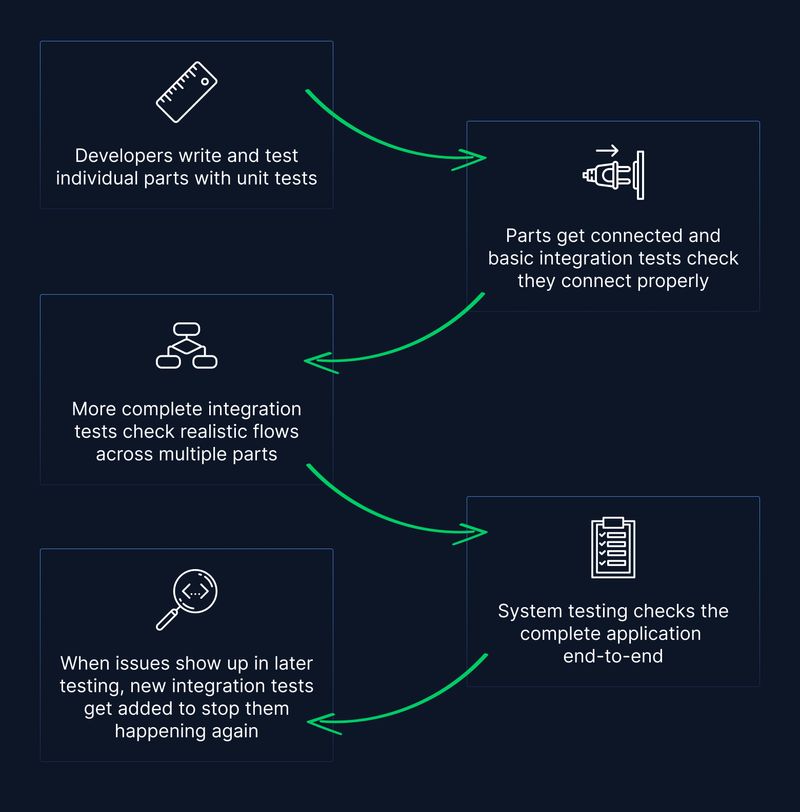
Integration testing is ongoing throughout development, not a one-time thing. Each time you add features or change existing ones, integration tests check nothing broke. For teams doing continuous integration, automated integration tests run with every code change. This gives quick feedback and stops integration problems from piling up.
If you're new to integration testing, start simple:
Don't feel pressure to get perfect coverage right away. A few well-chosen integration tests for critical paths give you far more value than testing everything. Testing that your shopping cart talks to your payment processor matters. Testing that your logging module writes to a log file? Probably fine to skip.
Integration testing works alongside other testing approaches, not instead of them. You still need unit tests to check individual parts and system tests to check the complete application. Integration testing just fills the gap between them, catching the problems that only show up when components start talking to each other – and inevitably discover they had very different ideas about how that conversation was supposed to go.
The goal is building confidence that your software works reliably when all the pieces come together. Not just in isolation where everything's perfect, but as the messy, interconnected system your users depend on.
Want more practical testing advice?
Subscribe to get straightforward tips on all things testing sent straight to your inbox.

If you liked this article, consider sharing
EDITORIALS
Testpad now has SOC 2 Type 2 certification, which verifies our security controls work consistently over time. It’s the next step following our earlier Type 1 certification.

EDITORIALS
Automated testing uses software to run tests without human involvement. It's faster for repetitive checks than manual, but both approaches have their place in a testing strategy.

EDITORIALS
New to Testpad? These features will help you test faster. From keyboard shortcuts to guest testing, here's what's worth knowing.