Test Management for Hardware Teams
Bring-up checklists, EVT/DVT/PVT runs, firmware regression at the bench. Testpad keeps them as test plans you write in plain text, with results tracked per unit and per build.







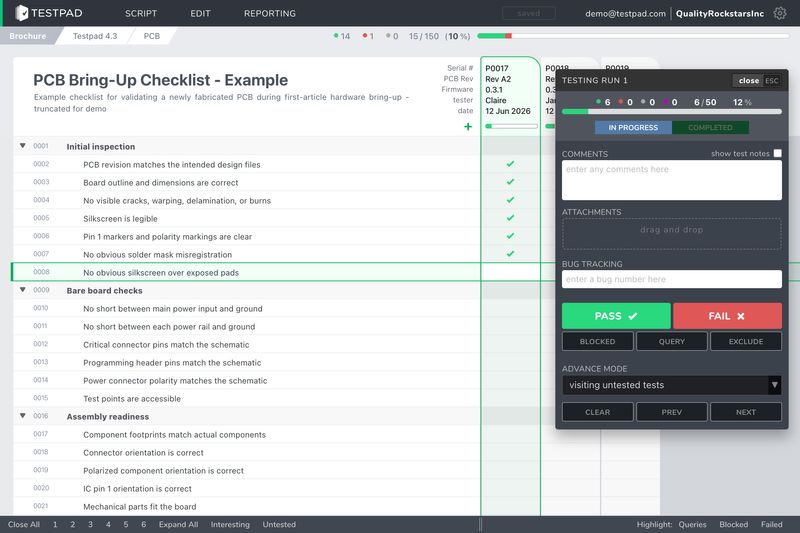
A test is one line of plain text
Test case forms want preconditions, steps and an expected result. A bench check doesn't need any of that: 'apply 5V at J1, measure 3.3V ±5% at TP12' already says what to do and what should happen. In Testpad that line is the whole test. Type it, hit enter, write the next.
Indent to group checks by power rail or subsystem. A complete bring-up plan takes minutes to write, and every board after the first gets the same plan.


“We've been using Testpad to track prototypes and execute hardware bring-up tests and are absolutely thrilled with it. The combination of features, reporting, and ease of use make it superior to anything we've used before. We find it more efficient and comprehensive than traditional approaches.”

Kyle Roberts
Snr DGX Server Platform Eng, NVIDIA
See every unit's results side by side
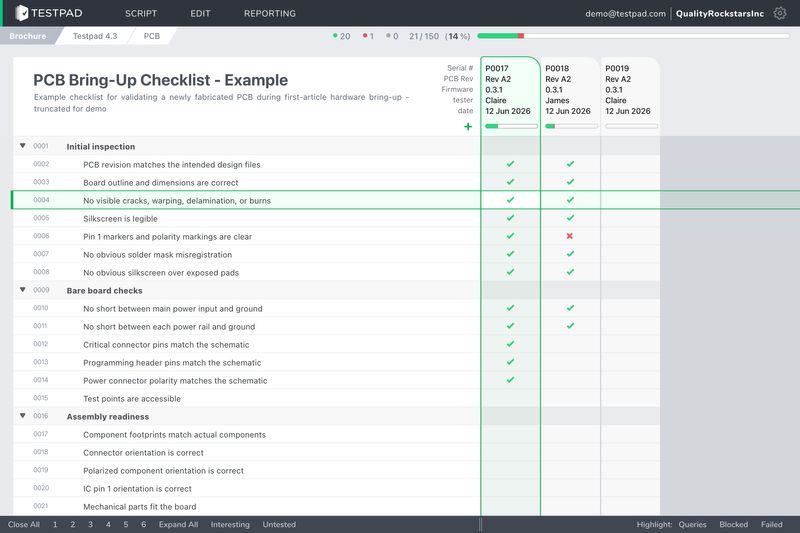
Unit #003 passes thermal and #004 doesn't. In Testpad those are two columns in the same plan, side by side, so the difference is something you see rather than something you hunt for across spreadsheet tabs. Add a column per unit, per board rev, or per configuration.
When the next build arrives, take a copy of the plan and give the new build clean columns. The old build keeps its results, so you can check which failures cleared between EVT and DVT.
“Testpad is great! We use it every day testing embedded software, making light work of our many environments and configurations. I haven't tried every QA tool out there but if I had the choice, I'd choose Testpad 10/10 times.”

Jason Pritchard
QA Engineer, Legrand
Evidence of testing, without the write-up
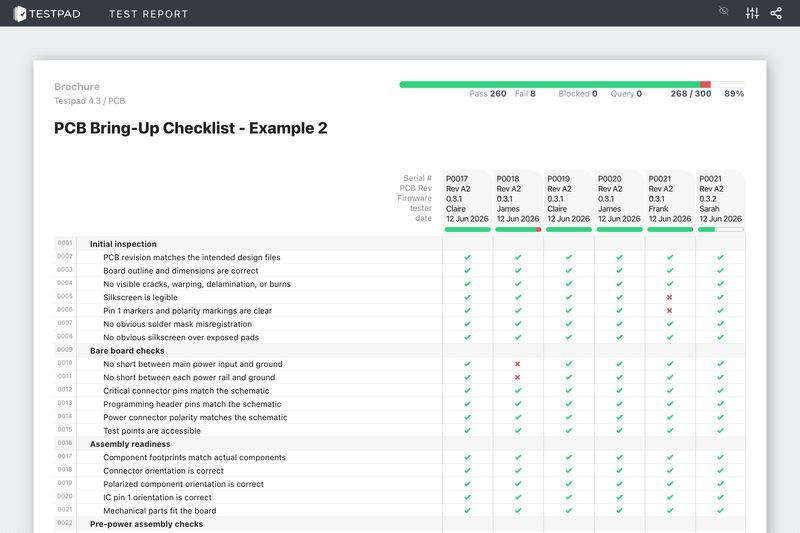
When a customer or a gate review asks for the test records, the report already exists: what passed, what failed, what's still untested, drawn straight from the plan your team worked through. Reports are easy to share, too: send a guest link to the report itself, or save it as HTML or a PDF and attach it to the handover email.
And when testing needs extra hands, or goes outside the team to a test lab or contract manufacturer, send the checklist as a guest link. They run it in a browser with no login, and their results land in the same plan.
























AND NOT JUST FOR HARDWARE, ALSO USED DAILY BY

QA Teams
Software Developers
Agencies
Where Testpad fits in a hardware program
Board bring-up
When the first prototype hits the bench
First power-on is a sequence you don't want to improvise: inspect, check the rails for shorts, power up on a current-limited supply, then work outward from power to clocks to peripherals. Write the sequence once and every board, and every respin, gets the same careful pass.
EVT, DVT and PVT builds
When 20 units get divided up across the test matrix
Drop, thermal, ingress, battery, RF: the build gets allocated, these five units to drop, those five to the chamber, and someone has to track which unit went where. Keep the allocation as a plan, collect the results as they come in, and take a copy for the next build so EVT and DVT stay comparable.
Firmware regression on real devices
When HIL covers a slice and humans cover the rest
Every release candidate gets the full pass on real devices: configurations, peripherals, upgrade paths from older firmware. Testpad keeps that as a reusable checklist your team works through release after release, alongside whatever you've automated.
Acceptance and low-volume production test
When a test jig won't pay back under 1,000 units
At low volume, end-of-line testing is a person with a written list, and acceptance test procedures run once per delivered unit. Run each unit against its checklist, collect results through guest links, and save the report for when the customer asks for the records.
What you can and
can't do with Testpad
What you can do with Testpad
Write a test plan as fast as you can type
Put real values in the test: 'apply 12V, check D3 is lit'
Indent to group checks by subsystem
Add a column for each unit, board rev, or firmware build
Reuse the same plan from first bring-up through PVT
Attach photos of the setup, the scope trace, or the damage
Hand checklists to the lab or the CM with a guest link
See per-unit pass/fail at a glance
Save the report as a PDF when the customer asks for evidence
Link issues to Jira, Azure DevOps, or any bug tracker
What you can't do with Testpad
Fill in preconditions, steps and expected result for 'check the LED'

Design a test case schema before you're allowed to start
Merge five conflicting copies of EVT_results_FINAL_v3.xlsx
Train a lab tech on test management software
Lose track of which board rev a result came from
Retype results from a paper checklist into the master spreadsheet
Wonder if the checklist on the bench is the current version
Find out after shipping that one unit skipped the RF check
PRICING
What Testpad costs
Essential
$49 $59
per month, billed annually per month, billed monthly
A basic account for 1, 2 or 3 testers
Team
$99 $119
per month, billed annually per month, billed monthly
Fully featured, for teams up to 10 testers
Team 15
$149 $179
per month, billed annually per month, billed monthly
Fully featured, for teams up to 15 testers
Department
$249 $299
per month, billed annually per month, billed monthly
Fully featured, for teams up to 25 testers
Every plan begins with a fully featured 30-day free trial, no credit card required. Bigger team? Custom plans with invoicing are available.
16 years, 1000s of customers and
over 100 million test results
“We've been using Testpad to track prototypes and execute hardware bring-up tests and are absolutely thrilled with it. The combination of features, reporting, and ease of use make it superior to anything we've used before. We find it more efficient and comprehensive than traditional approaches.”
 Kyle Roberts
Snr DGX Server Platform Eng, NVIDIA Testpad customer for 5 years
“Testpad is great! We use it every day testing embedded software, making light work of our many environments and configurations. I haven't tried every QA tool out there but if I had the choice, I'd choose Testpad 10/10 times.”
 Jason Pritchard
QA Engineer, Legrand Testpad customer for 8 years
“Testpad allows for rapid testing to fix issues in our software before it reaches our customers. The simplicity makes the testing process straight forward, gets the results to the engineering team, and is fun for the tester.”
 Brian Grau
Head of Production, OpenROV Testpad customer for 11 years
“We use Testpad to track all of our testing. It offers the depth and flexibility to model our entire test plan, but remains simple enough that onboarding new testers is effortless. The import and export facilities are really helpful for migrating test plans from other test management tools.”
 Eric Wolf
Senior Solutions Architect, Bell Testpad customer for 10 years
“Testpad has been a reliable and effective part of our test management procedure for years. It fulfils completely the compromise between productivity and formality, saving us from the headache of trying to do it with spreadsheets.”
 Nick Kenyon
Head of Operations, Numed Healthcare Testpad customer for 14 years
“Testpad has really made writing test plans a breeze for our team. It helps us to dive into our tests, isolate defects, and provide context around the results.”
 Luke Hefson
Engineering Manager, GitHub Testpad customer for 12 years
Common questions
What does Testpad manage?
The checks people run by hand: bring-up sequences, EVT, DVT and PVT validation runs, firmware regression on real devices, and acceptance test procedures. You write each plan in plain text and track results per unit and per build.
Is Testpad an automated test system like ATE or ICT?
No. Testpad doesn't control instruments or run test sequences. It manages the checks a person performs at the bench, and sits alongside whatever you've automated.
Do bench technicians or contract manufacturers need accounts?
People who test regularly need an account on your plan. For occasional extra help, or for people outside the team like a test lab or contract manufacturer, send a guest link: they run the checklist in a browser, with no login and nothing to learn, and their results go into the same plan.
Can I attach photos of the setup or a scope trace?
Yes. Attach photos, scope traces, or any other file to a test or its result, so the evidence stays with the check it belongs to.
How do I give a customer evidence of testing?
Reports are easy to share: send a guest link to the report itself, or save it as HTML or print it to PDF and attach it to an email. Raw results can also be exported as CSV.
How much does Testpad cost?
Plans are flat-rate: the Essential plan is $49 a month billed annually ($59 month-to-month) for up to 3 testers, and fully featured team plans with image attachments and guest testing start at $99 a month for 10 testers. Every plan starts with a free 30-day trial, no credit card required.
Put the next bring-up in Testpad instead of a spreadsheet.
You'll have a test plan before the boards arrive.

NO SOFTWARE DOWNLOADS
NO CREDIT CARDS
NO SHENANIGANS