he difference between Testpad and Xray is structural, and it's worth understanding before you pick either tool. Xray builds on Jira issues to model your tests; Testpad uses a checklist of plain text prompts in a standalone tool. This page sets out that difference, where each tool is stronger, and how the costs compare, so you can decide which fits the way your team tests.
The short version
- In Xray, a test is a native Jira issue: a configured issue type with fields, a workflow, and links to the requirements it covers. In Testpad, a test is a line of plain text in a checklist, in its own tool, outside Jira.
- Teams choose Xray to keep testing inside Jira, with full traceability from requirements through tests to defects. Teams choose Testpad for fast manual and exploratory testing, a guest-testing feature, and a tool that stands on its own.
- Xray's strength is being part of Jira. That is also its cost: you work through Jira, it bills on every Jira user rather than just your testers, and bringing in someone who isn't in Jira is hard.
- Testpad is from $10/user/month, and guest testers are free. Xray is priced by your total Jira user count.
- Neither choice is wrong. It comes down to whether you want your test tool to run within the Jira ecosystem, or whether you want it light and standalone.
What's the actual difference?
Xray is built into Jira. Every testing artifact is a real Jira issue: a Test, a Precondition, a Test Set, a Test Plan, a Test Execution. Because a test is a Jira issue, it shows up on your boards, in JQL, and in Jira reporting, and it links to the story it covers and the bug it found. Xray builds requirement coverage and traceability on top of those links, supports Cucumber and Gherkin for BDD, and pipes automated results in from CI. What you get, and what you maintain, is testing modeled as configured Jira issues.
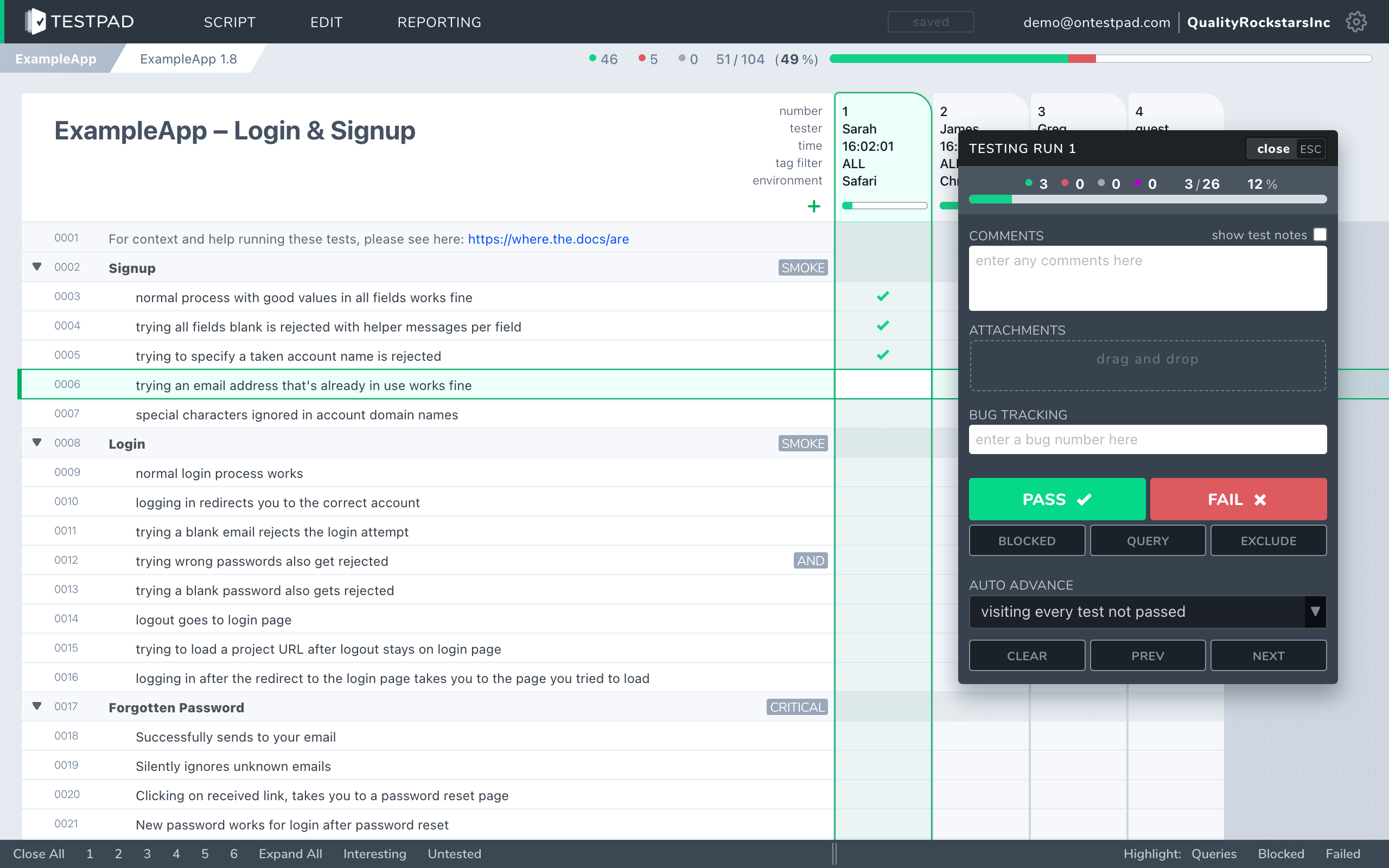
Testpad is built around the test plan, on its own. A test is a line of plain text. Indenting builds the plan's structure: group related tests under a heading, or spell a bigger test out over several lines. Add a column for each test run, and mark each prompt pass or fail as you go. There's no Jira to set up and no issue type to configure. You write the way you think, share the plan with a link, and anyone, in Jira or not, can run it.
If you live in Jira and want your tests to live there too, Xray's model is the point. If you'd rather a test stayed a checklist item, and your testers didn't all need Jira accounts, that's the gap Testpad fills.
How do Testpad and Xray compare?
A side-by-side comparison of the aspects that matter when choosing.
| Testpad | Xray |
|---|
| Data model | A test plan: a nested outline of plain-text prompts that read like a checklist, with a column per run | Testing as native Jira issues: Test, Test Set, Test Plan and Test Execution issue types, stored in Jira |
| Where it runs | Its own web app; nothing to install | Inside Jira (Cloud or Data Center); no standalone use |
| Time to first test | Minutes; write a line and you're testing | Longer; set up the Jira project, issue types, fields and workflow first |
| Writing tests | Type a line, hit enter, repeat | Create and configure a Jira issue per test; BDD via Cucumber and Gherkin |
| Guest / UAT testers | Share a link; no login, no seat, not in Jira | Testers work in Jira, so they generally need Jira access |
| Requirement traceability | Lightweight: clickable issue links | Deep: requirement to test to execution to defect coverage, built into Jira |
| Automation / BDD | Push results from CI via the REST API; Gherkin syntax supported | First-class: Cucumber and Gherkin run in Jira, with broad CI and framework integration |
| Reports | An instant link, shareable with anyone | Jira dashboards and coverage reports; advanced and cross-project reporting on higher tiers |
| Audit trail / permissions | Not today | Via Jira: issue history, permissions, audit logs |
| Pricing | From $10/user/month, guest testers free | By total Jira user count: from $10/month for up to 10 Jira users, then about $6.50 each per month per extra user |
| Best for | UAT, regression, exploratory, ad-hoc, hardware bring-up, dev-led testing | Jira-centric teams, deep traceability, regulated QA, large test repositories |
Xray facts checked against its Atlassian Marketplace listing, June 2026.
Why do teams choose Testpad over Xray?
Testers don't need to be in Jira. In Xray a test is a Jira issue, so anyone who runs or records a test works in Jira and generally needs an account. Send a Testpad plan as a link to a client, a freelancer, or a non-technical coworker, and they're testing in minutes: no login, no seat, no Jira account. For UAT and outside testers, that often decides the choice.
It stands on its own. Testpad doesn't assume Jira. If your team isn't all in Jira, or you'd rather your test data didn't live inside it, Testpad is a tool in its own right: write plans, run them, share reports, done.
Less to set up and maintain. No project configuration, issue types or workflows before you can write a test. And because frequent runs in Xray create a lot of Jira issues (Xray's own guidance is to split tests and executions into separate projects to keep things manageable), an outline you just add a column to stays lighter as testing grows.
Write-as-you-think speed. No issue form per test. Type a prompt, hit enter, type the next. One customer described it as "just like writing… feels like you're writing a document".
Cost that follows your testers, not your whole Jira org. Xray bills on your total Jira user count, so every developer, product manager and designer on the instance counts toward the price whether they ever run a test or not. Testpad charges for the people testing in Testpad.
Exploratory and ad-hoc, out of the box. Exploratory testing suits a checklist plan: set a scope, then explore within each prompt and record what you find. In Xray, dedicated exploratory support sits in a higher tier.
When is Xray the better choice?
When your team lives in Jira and you want testing to live there too. Tests as Jira issues give you requirement-to-defect traceability inside the tool your developers already use, coverage you can see on a Jira board, and audit evidence that holds up in regulated work. Its users in medical devices, automotive, aerospace and finance rely on exactly that. It handles manual and automated testing in one place, with strong Cucumber and BDD support and broad CI integration, and it scales to large test repositories. If your process depends on that traceability, or on testing being part of Jira rather than beside it, Xray is built for the job, and you'd likely be happier there. To see the wider field, our guide to Xray alternatives covers it.
When is Testpad the better choice?
When you want testing to be light and fast, and open to people who aren't in Jira. You run UAT with clients or freelancers, do regression and exploratory work, test hardware, or your developers test their own code and a configured Jira issue per test is more ceremony than the testing needs. Teams of that shape get going in minutes, keep the plan light enough to stay current, and don't pay for testing seats they only hand out for a two-week burst.
"We use Testpad to track all of our testing. It offers the depth and flexibility to model our entire test plan, but remains simple enough that onboarding new testers is effortless. The import and export facilities are really helpful for migrating test plans from other test management tools."
Eric Wolf, Senior Solutions Architect, Bell
Common questions
Is Testpad a replacement for Xray?
For lightweight, fast manual testing it can be: UAT, regression, exploratory, hardware, dev-led testing, checking AI output. If your testing depends on living inside Jira with deep requirement-to-defect traceability and audit history, that's what Xray is for, and Testpad doesn't replace it.
What's the actual difference in the data model?
Xray stores testing as native Jira issues (Test, Test Set, Test Plan, Test Execution), inside Jira. Testpad stores a test plan as a standalone nested outline of plain text prompts, with a column added per test run.
Does Testpad work without Jira?
Yes. Testpad is its own web app and doesn't need Jira or any tracker. Xray runs only inside Jira.
Does Testpad integrate with Jira?
Lightly. Set your tracker's URL pattern once and every issue ID you type in Testpad becomes a clickable link to the issue in Jira (or GitHub, Trello, and the like). There's a REST API for pushing automated results from CI. Outbound webhooks notify your other tools when runs finish or results change, directly or through Zapier and the like. There's no two-way sync and no coverage view inside Jira; Xray, being part of Jira, has those.
Can clients or non-technical people test in Testpad?
Yes. Share a link and a guest tests with no login, no seat, and no Jira account. Because Xray's tests are Jira issues, the same people would generally need Jira access.
How does pricing compare?
Testpad is from $10/user/month, and guest testers are free, charged for the people testing in Testpad. Xray is priced through the Atlassian Marketplace by your total Jira user count: cheap and flat for up to 10 Jira users, then scaling with every Jira user on the instance, not just your testers.
Does Testpad handle BDD or automated tests?
Testpad supports Gherkin-style syntax for BDD-flavored plans and takes automated results from CI through its REST API. It doesn't run automation itself. Xray's Cucumber execution and automation integration go deeper; if that's central to your work, Xray does more.
Does Testpad have an audit trail or per-user permissions?
Not today. Xray inherits Jira's issue history, permissions and audit logs; if your process requires those, check before you migrate anything.
See the difference in five minutes
The fastest way to choose is to write a real test plan in each. Testpad's free 30-day trial includes all features and up to 20 users, with no credit card and nothing to install. And no Jira required: paste in a chunk of your existing tests and see how they read as a standalone checklist.