estRail and Testpad start from different ideas of what a test is. In TestRail, a test is a case: a record with steps and an expected result, filed in a database. In Testpad, a test is a prompt: a single line telling a tester what to check. That sounds like a detail, but it sits upstream of everything else, including how fast you write tests, who can run them, and what each tool costs. This page walks through that difference and where each tool wins.
The short version
- A test in TestRail is a record in a case database, by default a form with preconditions, steps and expected result. A test in Testpad is a line of plain text in a checklist.
- Teams move to Testpad for write-speed, no-login guest testing, and reports you can share as a link.
- Teams stay on TestRail for deep traceability, granular permissions, audit history, and its integration ecosystem (two-way Jira, automation frameworks). Testpad doesn't have those today.
- Testpad is from $10/user/month, and guest testers are free. TestRail licenses every user, from $37/user/month.
- Neither choice is wrong. It depends on whether your testing is formal process or fast feedback.
What's the actual difference?
TestRail is built around the test case. A test is a record in a database: by default a title, preconditions, steps, and an expected result, often with custom fields on top. There are other templates, including one for exploratory sessions, but they're all case records you file, organize and keep current. That structure is what makes TestRail strong at traceability and formal process, and it's also what you maintain. TestRail has added AI case generation (since 2025), which speeds up the writing. It doesn't change what you end up owning: a database of cases that someone keeps current.
Testpad is built around the test plan. A test is a line of plain text. Indenting builds the plan's structure: group related tests under a heading, or spell a bigger test out over several lines. Add a column for each test run, and mark each prompt pass or fail as you go. There's no case database to design first: you write the way you think, and the structure comes from the outline, not from a form.
If you've ever stared at a preconditions / steps / expected result form for a five-second check and thought "this is more documentation than test", that's the gap. TestRail asks every test to become a structured case. Testpad lets a test stay a prompt.
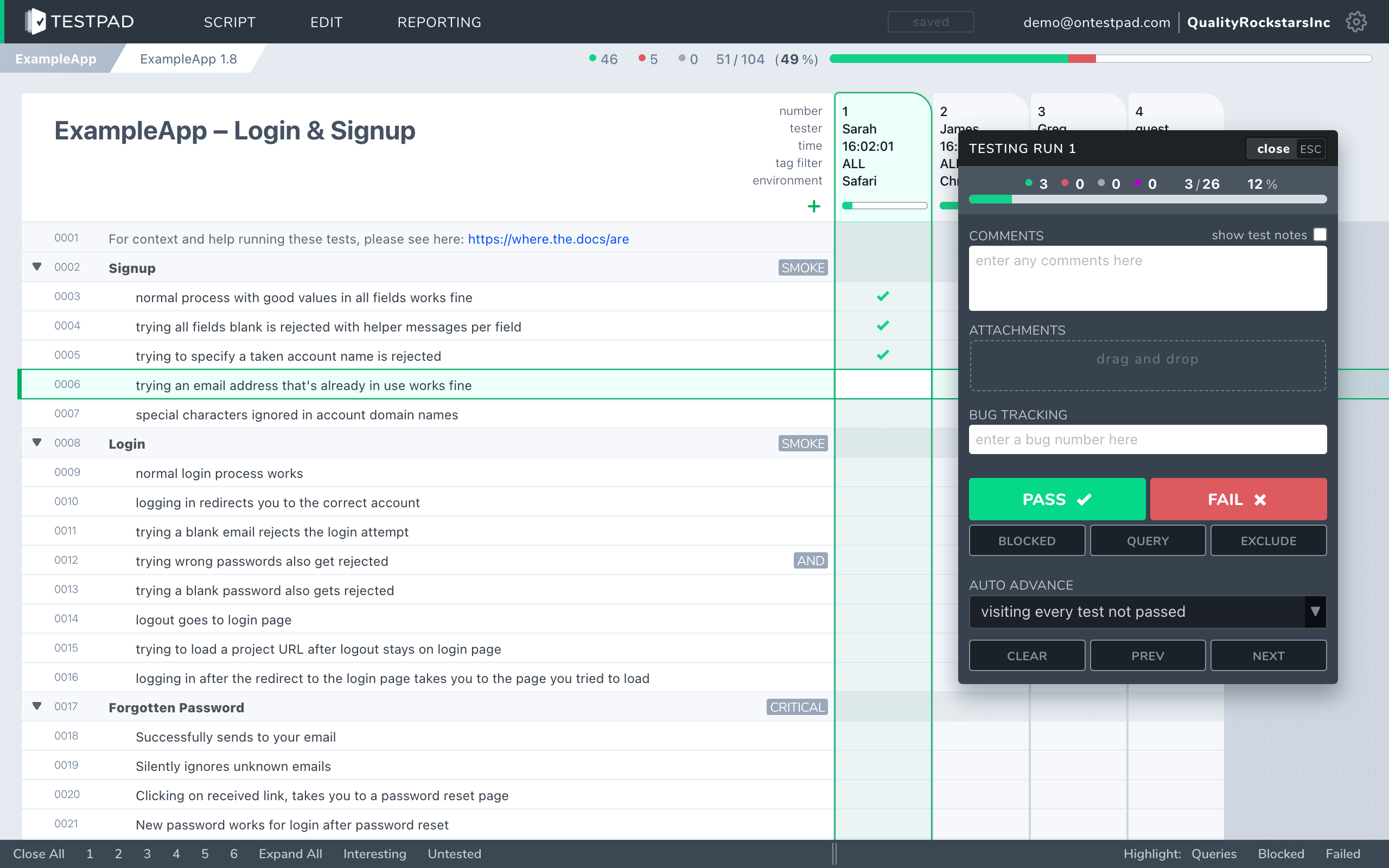
How do Testpad and TestRail compare?
A side-by-side comparison of the aspects that matter when choosing.
| Testpad | TestRail |
|---|
| Data model | Documents holding test plans: each a nested outline of test prompts that look like a checklist | Database of test cases: each holding title, preconditions, steps, expected outcomes and more |
| Time to first test | Minutes; no case structure to design | Longer; set up projects, suites and case fields first |
| Writing tests | Type a line, hit enter, repeat; or copy/paste import from AI suggestions | A form per case; AI generation (2025) speeds it up |
| Guest / UAT testers | Share a link; no login, no seat | Paid seat per user; no guest or viewer roles |
| Reports | An instant link, shareable with anyone | A report wizard builds each report; a notification arrives when it's ready to download |
| Traceability to requirements | Lightweight | Deep, with requirement and defect links |
| Integrations | Clickable issue links (Jira, GitHub, Trello); REST API for CI/CD results | A platform: two-way Jira, automation frameworks, CI/CD pipelines, extensive API |
| Audit trail / change history | Not today | Per-case history; full audit log on Enterprise |
| Per-user access control | Not today; anyone in an account can edit | Yes, granular roles |
| Pricing | From $10/user/month, guest testers free | $37/user/month (Professional); Enterprise billed yearly only |
| Best for | UAT, regression, exploratory, ad-hoc, hardware bring-up | Formal QA process, large QA teams, deep traceability |
Facts checked against TestRail 10.2 and its published pricing, June 2026.
"…saving 20–30% of my time using Testpad over TestRail."
Mike Gerrie, TestLauncher
Why do teams move from TestRail to Testpad?
Guest testing, where guests don't have to log in. Hand a client, a freelancer, or a non-technical coworker a link and they're testing in minutes. No account, no paid seat, no "can you re-send the spreadsheet". This is the most common reason teams switch, and it's where per-user licensing gets expensive: TestRail has no guest or viewer seats, so everyone who records a result needs a license, and its cloud billing now charges for the month's peak user count. A two-week UAT burst costs a full month of seats. Some teams cope by buying a few licenses and sharing logins, which gives up the per-person test history they're paying for.
Write-as-you-think speed. No form per case. Type a prompt, hit enter, type the next. One customer described it as "just like writing… feels like you're writing a document".
Less library to maintain. The most consistent complaint from long-term TestRail users is upkeep rather than quality: as one 2026 review put it, "maintaining a large test library can feel a bit manual - bulk updates, reorganizing sections, or refactoring lots of cases takes time". An outline is lighter to keep current: drag lines where they go, prune what you no longer run.
Reports anyone can read. TestRail's dashboards live behind a login. A Testpad report is a link you can send to a client or a manager, or a printout you leave on a desk: nobody needs an account to see how testing went.
Cost that matches what you use. The typical leaving-TestRail story is a team noticing they pay for a feature set they barely touch. In one reviewer's words: "it's becoming too expensive, especially since we don't take advantage of most of its features". If your testing is checklists, runs and reports, Testpad does all of it, and you're not paying for the parts you'd never open.
One tool across all your testing. UAT, regression, exploratory, ad-hoc. The same outline flexes to all of them, and your CI/CD can inject automated results through the API, so automated and manual tests sit side by side in the same report.
When is TestRail the better choice?
When your QA is heavyweight and formal: regulated sign-off, deep requirement-to-defect traceability, audit history of who changed what, granular per-user permissions, and a large QA organization that lives in the tool full-time. TestRail is also a platform in a way Testpad isn't: two-way Jira integration with test coverage visible inside Jira, plus connectors for automation frameworks and CI/CD pipelines. If your testing needs to plug into that ecosystem, TestRail is built for it. TestRail's own users praise exactly these things: structure that holds up at scale, progress that's "visible at a glance" to management, and the ability to see who tested each case. If neither tool is quite the shape you need, our guide to the best test management tools covers the wider field.
When is Testpad the better choice?
When you want to spend your time testing rather than maintaining a case database: you run UAT with outside testers, do regression and exploratory work, test hardware, or you're escaping either a spreadsheet or a heavy tool you bought and never used. Teams of that shape get testing in minutes and keep the plan light enough to stay current.
"We use Testpad to track all of our testing. It offers the depth and flexibility to model our entire test plan, but remains simple enough that onboarding new testers is effortless. The import and export facilities are really helpful for migrating test plans from other test management tools."
Eric Wolf, Senior Solutions Architect, Bell
Common questions
Is Testpad a replacement for TestRail?
For most manual testing, yes: UAT, regression, exploratory, hardware, checking AI output. For heavyweight formal QA that depends on audit trails, granular access control, and deep traceability, TestRail does things Testpad doesn't do today.
What's the actual difference in the data model?
TestRail stores each test as a structured case (preconditions, steps, expected result) in a database you design and maintain. Testpad stores a test plan as a nested outline of plain text prompts, with a column added per test run.
Can I migrate my test cases from TestRail to Testpad?
Yes. Export from TestRail to a spreadsheet, then paste or import into Testpad. Case titles become prompts; steps become indented lines underneath. Most teams take the move as a chance to prune the cases nobody runs any more.
Can non-technical people test in Testpad?
Yes. Share a link and a guest tests with no login, no seat, and very little training. This is the most common reason teams switch.
How does pricing compare?
Testpad is from $10/user/month, and guest testers are free. TestRail licenses every user: Professional is $35/user/month billed annually ($420/user/year) or $37/user/month month-to-month; Enterprise is $852/user/year, billed annually only. If most of your testers are part-time or external, that's where the difference shows.
Does Testpad integrate with Jira?
Lightly. Set your tracker's URL pattern once and every issue ID you type in Testpad (test results, descriptions, comments) becomes a clickable link straight to the issue in Jira, GitHub, Trello or similar. There's also a REST API for pushing automated results from CI/CD. Outbound webhooks notify your other tools when runs finish or results change, directly or through Zapier and the like. There's no two-way sync and no coverage view inside Jira; if your workflow depends on those, TestRail does them.
Does Testpad have an audit trail or per-user permissions?
Not today. If your process requires those, TestRail has them; check before you migrate anything.
See the difference in five minutes
The fastest way to choose is to write a real test plan in each. Testpad's free 30-day trial includes all features and up to 20 users, with no credit card and nothing to install: paste in a chunk of your existing test cases and see how they read as a checklist.