oth Testpad and TestLodge sit at the lightweight end of test management. Neither expects you to be running a formal QA lab, and both get you to a first test plan quickly. The difference is in the data model: what a "test" actually is in each tool. That choice shapes how you write plans, who can run them, and how you scale. This page sets out the difference precisely, covers where each tool is stronger, and compares pricing, so you can decide which fits the way your team works.
The short version
- TestLodge stores structured test cases: each case has a title, a description, numbered steps, and one expected result. A Testpad test is a single plain-text prompt line.
- Both are lightweight. The distinction is structured forms versus freeform prompts, not heavy versus light.
- TestLodge prices by content volume (number of test runs, plans, and cases), with unlimited user accounts. Testpad prices per tester.
- TestLodge requires every tester to have an account. Testpad's Guest Testing feature lets you invite people to run a plan with no login required.
- TestLodge has a Requirements module for traceability. Testpad does not.
- Testpad is from $10/user/month, and guest testers are free. TestLodge starts at $34/month, priced by content (test runs/plans/cases) with unlimited users, not per seat.
What's the actual difference?
TestLodge is a structured test-case manager. The data model runs Project > Test Plan > Test Suite > Test Case > Test Run. Each test case is a form: you fill in a title, a description, numbered steps, and an expected result. Attachments can go on a case. The Requirements module lets you link test cases to documented requirements and generate a traceability matrix. When you start a test run, testers work through the case list step by step and record a result per case. If a test fails, TestLodge can automatically open a bug-tracker ticket. It's cloud SaaS only, focused on manual testing, with no native automation support.
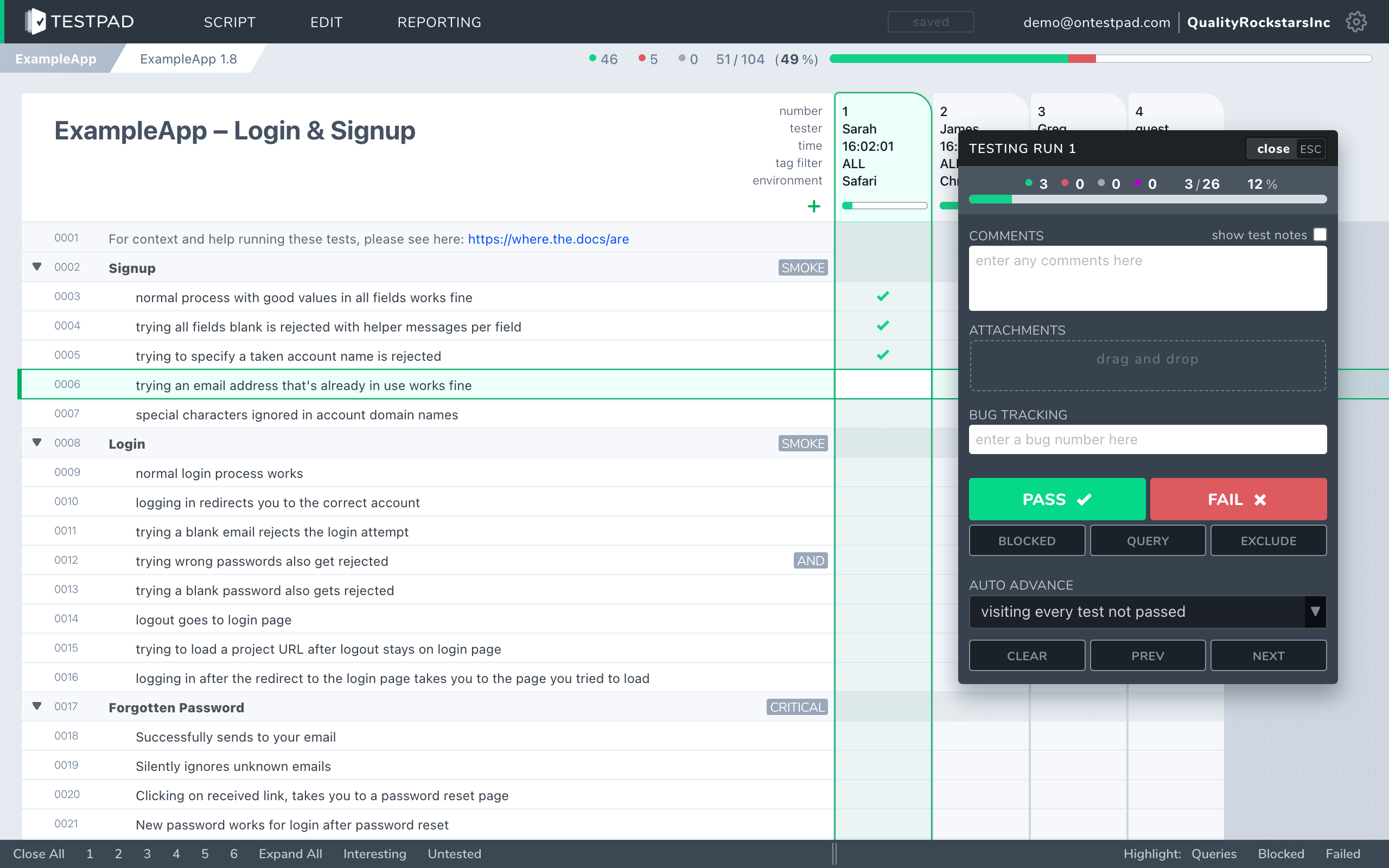
Testpad is built around the test plan as an outline. A test is a line of plain text. You write a prompt that tells the tester what to check: "Login with expired password", "Add ten items to basket, then apply a 20%-off voucher", "Resize window to 320px and check the menu". Indent to group related tests under a heading, or break a scenario into smaller steps. Add a column for each test run and mark each prompt pass or fail as you go. That's the whole model. There are no per-test ID numbers, no structured-step forms, and no per-case expected-result field. You get a column-per-run grid so run history is visible at a glance, and a shareable report link.
The distinction matters most when you're deciding how to write tests. Filling a structured form per test is thorough for formal documentation, and the expected-result field gives reviewers a clear basis for checking whether a case passed. A one-line prompt is faster to write and better suited to cases where the tester already knows what a pass looks like, or where you're exploring a feature rather than verifying a spec.
How do Testpad and TestLodge compare?
A side-by-side comparison of the aspects that matter when choosing.
| Testpad | TestLodge |
|---|
| Data model | A nested outline of plain-text prompt lines; indent for structure; one column per run | Structured test cases: title, description, numbered steps, one expected result per case |
| Where it runs | Cloud SaaS; nothing to install | Cloud SaaS; nothing to install |
| Time to first test | Minutes; type a line and you're testing | Quick; fill in a test-case form for each test |
| Writing tests | Type a prompt, hit enter, repeat | Create a case form: title, description, numbered steps, expected result |
| Guest / UAT testers | Share a link; no login needed for guests | All testers need an account |
| Requirement traceability | Not today | Requirements module with a traceability matrix |
| Run history | Column-per-run grid; history visible at a glance | Separate run instances per execution |
| Bug-tracker integration | Clickable issue links; REST API for CI results | Auto-create a bug-tracker ticket on a failed test |
| Reporting | Shareable report link | Built-in reporting per run; CSV and other export |
| Audit trail / permissions | Not today | Per-test history; per-case versioning |
| Pricing | From $10/user/month, guest testers free | $34/month to $279/month/month; priced by content (test runs/plans/cases) with unlimited users, not per seat |
| Best for | UAT, exploratory, regression, ad-hoc, hardware bring-up, dev-led testing | Teams that want structured, formally documented test cases with traceability to requirements |
TestLodge facts checked against testlodge.com, June 2026.
Why do teams choose Testpad over TestLodge?
One-line prompts are faster to write. Filling a test-case form for every check adds time before testing can start, and the overhead compounds across a large plan. In Testpad, a line is a test. For UAT, exploratory work, and regression plans where you already know what you're checking, a prompt is enough and the form is ceremony.
Guest Testing doesn't require accounts. TestLodge requires every tester to have an account. Testpad's Guest Testing feature lets you invite clients, freelancers, or non-technical stakeholders to run a plan with no login. They click the link and they're testing. For UAT rounds, that means no TestLodge accounts to create for people outside the team. Most Testpad users log in as normal; Guest Testing is a feature you turn on when you need outside testers.
Run history is visible without navigation. Testpad's column-per-run grid shows every run side by side. You can see at a glance which tests have been passing consistently and which have been flaky across the last five runs. In TestLodge, runs are separate instances you open individually.
Write-as-you-think speed. No form per test, no expected-result field to fill. Write plans the way you'd write a checklist or a script for someone else to follow. One customer described Testpad as "just like writing... feels like you're writing a document".
Two different pricing models. TestLodge charges a flat rate by content volume, with unlimited users. Testpad charges per tester, in tiers, with guest testers free. Which works out cheaper depends on your team size and how many test cases you keep.
"We use Testpad to track all of our testing. It offers the depth and flexibility to model our entire test plan, but remains simple enough that onboarding new testers is effortless. The import and export facilities are really helpful for migrating test plans from other test management tools."
Eric Wolf, Senior Solutions Architect, Bell
When is TestLodge the better choice?
When structured, formally documented test cases matter. The numbered-steps-plus-expected-result form gives every case a clear documented baseline: anyone reading it knows what was tested, what the expected behavior was, and what result was recorded. That's useful for audit situations, regulated industries, and formal QA processes where a tester's judgment alone isn't enough documentation. The Requirements module and traceability matrix connect test cases back to requirements, which is important for teams that need to show coverage. The auto-create-ticket-on-fail integration opens a bug-tracker ticket for you when a case fails, which saves a step for teams who track bugs in a separate tool. And the flat content-based pricing with unlimited users means a small team with a fixed suite can add testers without the per-seat cost going up.
If your process needs all of that, TestLodge covers it. If you want to explore the wider market, our guide to TestLodge alternatives covers the options.
When is Testpad the better choice?
When you want testing to move fast, and when some of your testers are outside the team. You're running UAT with clients or a freelance QA contractor, doing exploratory or regression testing, testing hardware builds, or your developers test their own features and a structured test-case form per check is more overhead than the work needs. Testpad gets you from "we need to test this" to "we are testing this" in minutes, keeps the plan light enough to stay current, and lets you bring in outside testers without creating accounts for them.
Testpad does not have a requirements module, per-test IDs, or an audit trail. If your process depends on formal traceability or regulated documentation, check those gaps before switching.
Common questions
Is Testpad a replacement for TestLodge?
For fast manual and exploratory testing, UAT, and regression plans where you don't need structured case forms or requirement traceability, yes. If your process depends on numbered test steps, per-case expected results, a requirements module, or formal traceability, TestLodge covers those and Testpad doesn't today.
What's the actual difference in the data model?
TestLodge stores structured test cases: each has a title, description, numbered steps, and one expected result. Testpad stores a test plan as a nested outline of plain-text prompt lines, with one column added per test run.
Does TestLodge require accounts for all testers?
Yes. Every person who runs or records tests in TestLodge needs an account. Testpad's Guest Testing feature lets you invite testers to run a plan with no login; they click a link and test without creating an account.
How does pricing work for each?
TestLodge is priced by content (test runs/plans/cases) with unlimited users, not per seat: $34/month (Personal), $69/month (Basic), $139/month (Plus), or $279/month (Premium) per month. You can add unlimited user accounts at any tier; you pay more as your content volume grows. Testpad is from $10/user/month, and guest testers are free, charged for the people testing in Testpad. Guest testers don't count toward the seat total.
Does Testpad have a requirements or traceability module?
Not today. TestLodge has a Requirements module that links test cases to documented requirements and generates a traceability matrix. If your process depends on requirement-to-test traceability, TestLodge has it and Testpad doesn't.
Can I see test history across multiple runs in Testpad?
Yes. Testpad adds a column per run, so every run sits beside the others in a grid. You can see pass/fail history across runs at a glance. TestLodge opens runs as separate instances.
Does Testpad have an audit trail or per-test history?
Not today. TestLodge keeps per-case history and versioning. If your process requires a documented record of who tested what and when at the case level, TestLodge covers that and Testpad doesn't.
Can Testpad auto-create bug tickets when a test fails?
Not automatically. Testpad lets you set a bug-tracker URL pattern so every issue ID you type becomes a clickable link to your tracker, and there's a REST API for pushing automated results from CI. Outbound webhooks notify your other tools when runs finish or results change, directly or through Zapier and the like. TestLodge can auto-open a ticket in your bug tracker when a test run case is marked failed.
See the difference in five minutes
The fastest way to decide is to write a real test plan in each. Testpad's free 30-day trial includes all features and up to 20 users, with no credit card and nothing to install. Paste in a chunk of your existing tests and see how they read as a plain-text outline.