he difference between Testpad and TestLink is not just about features; it starts with what kind of software each one is. TestLink is an open-source PHP application you download, install on a server you own, and keep running yourself. Testpad is a hosted web app: sign up, write a test, start. This page sets out that difference, where each tool is stronger, and how the costs actually compare, so you can decide which fits the way your team works.
The short version
- TestLink is a structured test-case database you self-host: Test Projects contain Test Suites, which contain Test Cases with numbered steps and expected results. Tests are organized into Test Plans and Builds, which lets you track results build by build. Every tester needs a registered account.
- Testpad is a hosted tool where a test is a line of plain text. Indent to build structure. Add a column per test run and mark pass or fail down the list. Share a report as a link. Invite outside testers without giving them a login.
- TestLink's license is Free (open-source). The cost is the server you provision, secure, patch, and back up, plus the time to do it, with no official support channel. Testpad is from $10/user/month, and guest testers are free.
- Neither choice is wrong. If you need on-premises data control, structured test cases with build-by-build traceability, and zero license fee, TestLink is worth the operational overhead. If you want something you can start using in minutes, open to outside testers, and maintained by someone else, that's what Testpad is for.
What's the actual difference?
TestLink is a structured, self-hosted test-case database. The data model is layered: a Test Project contains Test Suites, which contain Test Cases with a title, preconditions, numbered steps, and expected results. Tests are versioned, carry per-test IDs, and can be linked to requirements for traceability. You assemble Test Plans from selected test cases and run them against named Builds, giving you a pass/fail record per build. Role-based permissions assign different access levels per user: test designer, senior tester, leader, admin. TestLink has been in production since 2003; the open-source project is now in slow maintenance mode, with no formal support outside the SourceForge community forum.
You install and run it yourself: a web server running PHP, a MySQL or MariaDB database, and ongoing backups, security patches, and upgrades. There is no SaaS option.
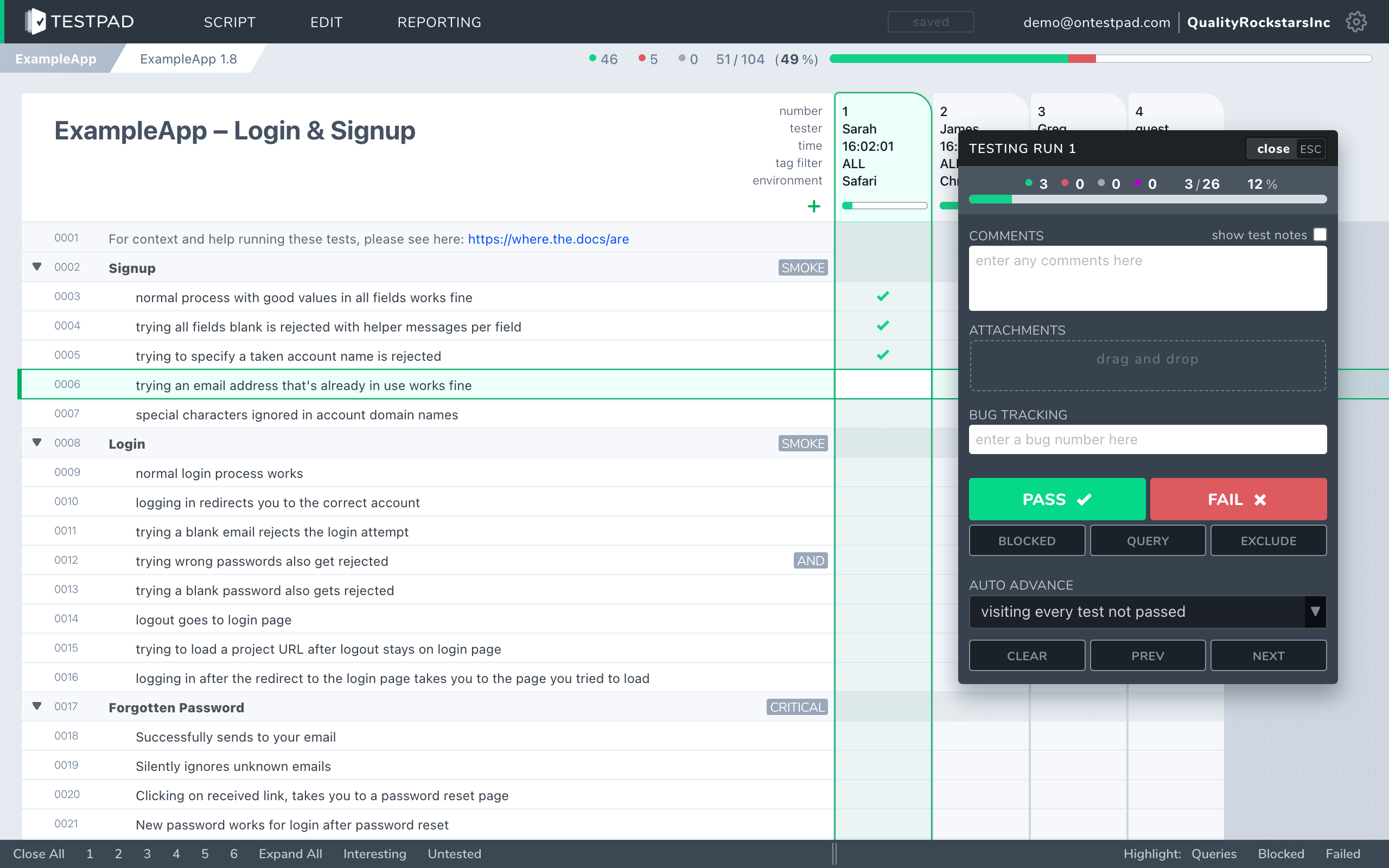
Testpad is a hosted tool built around the test plan as a document. A test is a line of plain text, a prompt you act on and record. Indenting builds structure: group related tests under a heading, or expand a single test into a few lines of detail. Add a column for each test run and mark each prompt pass, fail, or not run as you go. There is no structured test-case form to fill in, no build matrix to configure before you start. Write the way you think, share the plan or its report as a link, and the people running it don't need accounts if you'd rather they didn't.
The tradeoff is straightforward: TestLink's structured model scales to large, formally organized suites with traceability and per-build records; Testpad's plain-text model gets you testing faster and keeps the plan light enough to stay current.
How do Testpad and TestLink compare?
A side-by-side comparison of the aspects that matter when choosing.
| Testpad | TestLink |
|---|
| Data model | A test plan: a nested outline of plain-text prompts that read like a checklist, with a column per run | Test Projects > Test Suites > Test Cases (numbered steps, expected results, versioned) > Test Plans + Builds |
| Where it runs | Hosted SaaS; nothing to install or maintain | Self-hosted only: PHP + MySQL on a server you own and manage |
| License cost | From $10/user/month, guest testers free | Free (self-hosted); you absorb the hosting and maintenance cost |
| Time to first test | Minutes: sign up, write a line, start | Longer: provision a server, install and configure the application, then define structured test cases |
| Writing tests | Type a line, hit enter, repeat | Create a test case with preconditions, numbered steps, and expected results |
| Per-test IDs and versioning | No per-test IDs today | Yes: each test case has an ID and version history |
| Requirement traceability | Lightweight: clickable issue links | Yes: requirements can be linked to test cases and coverage tracked |
| Guest / UAT testers | Share a link; no login required for external testers | Every tester needs a registered account on your TestLink instance |
| Build-by-build traceability | Columns per run, not formal Builds | Yes: Test Plans and named Builds let you compare results across releases |
| Per-user role permissions | Not today | Yes: granular roles (admin, leader, test designer, senior tester, tester) per project |
| Automation result ingestion | Push results from CI via the REST API | Yes: XML-RPC and REST API for automated result imports |
| Reports | An instant shareable link or saved HTML | HTML and XML reports; filterable by build, platform, and tester |
| Official support | Email support included | Community forum only; no commercial support |
| Best for | UAT, regression, exploratory, hardware bring-up, dev-led testing, fast iteration | Regulated teams with on-prem data requirements, formal test case libraries, and the IT resource to run infrastructure |
TestLink facts checked against testlink.org and its SourceForge project, June 2026.
Why do teams choose Testpad over TestLink?
Nothing to install, configure, or maintain. Testpad is a hosted service. There is no server to provision, no PHP stack to configure, no database to back up, and no security patches to apply at inconvenient moments. The running cost of a TestLink deployment is the machine, the time to maintain it, and the risk of gaps. With Testpad, that work disappears.
Guest testing without accounts. Every person who runs a test in TestLink needs a registered account on your instance. Share a Testpad plan as a link, and external testers or clients record their findings with no login and no seat. For UAT with outside testers, that means no TestLink accounts to create.
Write-as-you-think speed. Opening a new TestLink test case means filling in a form: title, preconditions, a numbered step, its expected result, and then the next step. In Testpad, a test is a line. Type it, press Enter, write the next one. For teams doing exploratory, regression, or fast-moving development cycles, that speed compounds over time.
No server cost hidden inside "free". TestLink's license is free; the server it runs on is not. A VPS, keeping it patched and available, and the time of whoever maintains it add up, with downtime risk if the machine goes down before a release.
Shareable reports. A Testpad report is a link anyone can open, or a single saved HTML file. Sending a TestLink report to a stakeholder outside your instance means exporting and attaching a file.
Email support. Testpad includes email support. TestLink's support is the community forum; responses depend on volunteer availability.
When is TestLink the better choice?
When data sovereignty and zero license cost are the requirements that matter most. TestLink runs entirely on infrastructure you control, and the GPL license means you can audit and modify the code. For teams in regulated industries or government environments where test data must stay on-premises and cannot be held by a third-party SaaS provider, that constraint alone settles the choice.
Beyond that: TestLink's per-test IDs and versioning give you a persistent, auditable record of each test case across every change. The requirements-to-tests link provides formal coverage evidence. Named Builds let you compare pass rates across releases or platforms in a way that Testpad's column model does not. Granular per-user roles let you separate who can design tests, who can execute them, and who can approve them. If your process depends on any of those, TestLink handles them and Testpad does not. To see the wider field, a guide to TestLink alternatives covers other options at a similar or lower price point.
When is Testpad the better choice?
When you want a test tool your team can start using today, open to people outside your organization, and maintained by someone else. You run UAT with clients or freelancers, do regression and exploratory testing on a fast release cadence, test hardware in the field, or your developers test their own code and a full structured test-case form per check is more overhead than the testing needs. Teams of that shape get going in minutes and don't carry the operational cost of a self-hosted application.
"We use Testpad to track all of our testing. It offers the depth and flexibility to model our entire test plan, but remains simple enough that onboarding new testers is effortless. The import and export facilities are really helpful for migrating test plans from other test management tools."
Eric Wolf, Senior Solutions Architect, Bell
Common questions
Is Testpad a replacement for TestLink?
For teams moving away from a self-hosted tool toward something hosted and lower-maintenance, often yes. For teams that specifically need on-premises data control, formal per-test IDs and versioning, or granular role permissions, Testpad does not cover those today, and you should check against your requirements before switching.
What's the actual difference in the data model?
TestLink organizes tests as structured test cases: numbered steps, expected results, version history, and per-test IDs, grouped into Test Suites and assembled into Test Plans against named Builds. Testpad stores a test plan as a nested outline of plain text prompts with a column added per test run.
Is Testpad open-source or self-hosted?
No. Testpad is a hosted SaaS product; there is no self-hosted edition or open-source license. TestLink is open-source under the GPL and self-hosted only, with no SaaS option. If on-premises hosting or the ability to inspect and modify the source code is a requirement, TestLink (or another open-source tool) is the option to evaluate.
Can clients or outside testers use Testpad without accounts?
Yes. That is what Guest Testing means: share a Testpad plan as a link, and an external tester records findings with no login, no seat purchase, and no registration on your instance. TestLink requires every tester to have a registered account on the server; there is no guest or link-based access.
How does pricing actually compare?
TestLink's license is Free (open-source), but the tool runs on a server you own and maintain. Depending on your setup, that means a hosting bill, the time of whoever provisions and patches it, and the risk of downtime. Testpad is from $10/user/month, and guest testers are free, covers hosting, email support, and all feature updates, and requires no infrastructure.
Does TestLink have better support for automation?
TestLink accepts automated results via its XML-RPC and REST API, so CI tools can post pass or fail against specific test cases and builds. Testpad has a REST API for pushing results from CI, but TestLink's model is more formal: results attach to a specific test case version in a named build, which gives you structured historical records across releases. Outbound webhooks notify your other tools when runs finish or results change, directly or through Zapier and the like.
Does TestLink have per-user roles and permissions?
Yes, and Testpad does not. TestLink has five built-in roles (admin, leader, test designer, senior tester, tester) that you assign per project, so you can separate who writes tests, who runs them, and who manages the project. Testpad has no per-user permissions today; everyone with access to a project can do the same things. If role separation is a process requirement, TestLink has it and Testpad does not.
Does Testpad have an audit trail?
Not today. TestLink records who created and last modified each test case, and execution history is tied to named builds, giving you a traceable record over time. If your process or compliance regime requires that level of audit history, check Testpad's current feature set before migrating.
See the difference in five minutes
The fastest way to choose is to run a real test plan in each. Testpad's free 30-day trial includes all features and up to 20 users, with no credit card and nothing to install. If you're currently self-hosting TestLink, paste a chunk of your existing tests into Testpad and see how they read as a plain-text checklist before you decide either way.