he difference between Testpad and qTest is a question of scope and scale. qTest, now part of the Tricentis suite, is an enterprise test management platform: structured test cases, automation orchestration across your whole CI pipeline, requirement-to-defect traceability, and compliance reporting, sold through a sales conversation. Testpad is a standalone checklist tool for manual and exploratory testing: write a line of plain text, add a column per test run, share the report as a link, and invite guest testers for UAT without buying them a seat. This page sets out where each tool fits, what the tradeoffs are, and how the costs compare.
The short version
- qTest is an enterprise test management platform from Tricentis. Its core identity is structured test cases inside Test Modules, executed through Test Cycles, with two-way Jira integration for requirement-to-defect traceability and an audit trail for compliance. It also orchestrates automation results from Selenium, Jenkins, Tosca and other CI tools.
- Testpad is a standalone tool outside Jira. A test is a line of plain text. Indent to build structure; add a column per run; share the report with a link. Invite people to test as guests with no login and no seat required.
- Teams choose qTest when they need enterprise scale, deep traceability, automation orchestration, audit history, or on-premise deployment. Teams choose Testpad for fast manual and exploratory testing, UAT with outside testers, and a tool that works without a sales conversation or a significant procurement budget.
- qTest is priced by quote: $1,200/user/year is a commonly reported figure for standard access, but enterprise contracts vary and you need a sales conversation to get a number. Testpad is from $10/user/month, and guest testers are free, on the website, without a call.
- Neither choice is wrong. It depends on whether your testing needs the depth and compliance infrastructure of an enterprise platform, or whether it needs to start this afternoon.
What's the actual difference?
qTest is built for enterprise test management. Test cases in qTest are structured records: each has steps, expected results, custom fields, a system ID, and a full version history. They sit inside Test Modules (folders), are executed through Test Cycles and Test Suites, and link to requirements imported from Jira for end-to-end coverage (requirement to test to execution run to defect). The platform is modular: qTest Manager handles cases and execution; qTest Launch aggregates automated results from Selenium, Jenkins, Tosca and other CI frameworks alongside manual runs; qTest Insights provides cross-project reporting; qTest Pulse handles event-driven notifications and integrations; qTest Scenario supports Cucumber/BDD. It runs in the cloud and supports on-premise. SOC 2 Type 2 and ISO 27001 certifications are available for compliance teams. This is the architecture of a tool designed for organizations running thousands of test cases across many projects, teams, and automation frameworks, where traceability and audit evidence are requirements, not nice-to-haves.
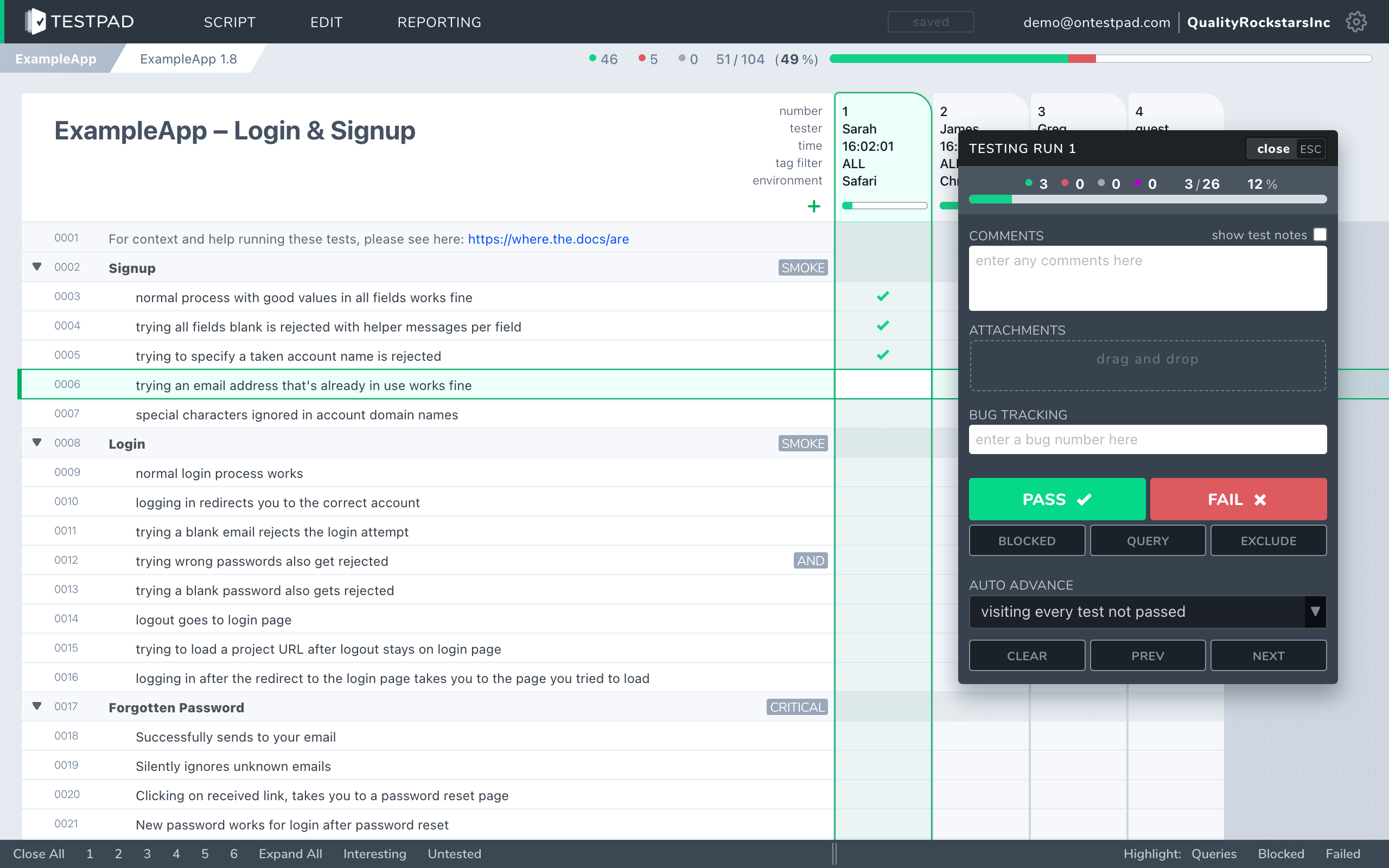
Testpad is built around the test plan. A test is a line of plain text: write a prompt that tells you what to check, hit enter, write the next. Indent to group related tests under a heading or to spell a bigger test out over several steps. When you're ready to run, add a column; mark each prompt pass or fail as you go. There are no modules to configure, no test-case IDs to assign, no structured fields to fill in before you can write a test. Share the plan as a link; anyone with the link can follow it or run it. Invite people as guests for UAT and they test without creating an account.
If your testing requires the audit trail, automation orchestration, and compliance infrastructure of an enterprise platform, qTest is built for the job. If you want your test to be a prompt on a list, not a structured record in a system, that's what Testpad is for.
How do Testpad and qTest compare?
A side-by-side comparison of the aspects that matter when choosing.
| Testpad | qTest |
|---|
| Data model | A test plan: a nested outline of plain-text prompts that read like a checklist, with a column per run | Structured test cases (steps, fields, IDs, version history) inside Test Modules; executed via Test Cycles and Suites |
| Where it runs | Its own web app; nothing to install | Cloud SaaS or on-premise; part of the Tricentis suite |
| Time to first test | Minutes; write a line and you're testing | Longer; set up the platform, configure modules and cycles, then define structured test cases |
| Writing tests | Type a prompt, hit enter, repeat | Create a structured test case with steps, expected results, custom fields, and a system ID |
| Guest / UAT testers | Share a link; no login, no seat required | Seat-based; every participant needs a licensed account |
| Requirement traceability | Lightweight: clickable issue links | Deep: requirement to test to execution to defect, with coverage maps, inside Jira |
| Automation orchestration | Push results from CI via the REST API | First-class: qTest Launch aggregates Selenium, Jenkins, Tosca, and other CI results alongside manual runs |
| BDD / Gherkin | Gherkin-style syntax supported | qTest Scenario supports Cucumber and Gherkin natively |
| Reports | An instant link, shareable with anyone | Cross-project dashboards via qTest Insights; advanced reporting across automation and manual |
| Audit trail / permissions | Not today | Yes: per-test version history, execution records, and audit logs |
| On-premise | No | Yes |
| Pricing | From $10/user/month, guest testers free | Quote-based; $1,200/user/year is a commonly reported standard figure, enterprise contracts vary |
| Best for | UAT, regression, exploratory, ad-hoc, hardware bring-up, dev-led testing | Enterprise QA, compliance, automation orchestration, large structured test suites, regulated industries |
qTest facts checked against tricentis.com/products/unified-test-management-qtest, June 2026.
Why do teams choose Testpad over qTest?
You know the price before you call anyone. qTest requires a sales conversation; the number you see on a vendor comparison site may not match the contract you sign. Testpad's pricing is on the website: from $10/user/month, and guest testers are free. For teams buying without a procurement process, or smaller teams weighing the cost against the value, that difference matters.
Guest testing for UAT. qTest is seat-based: every person who tests needs a licensed account. Testpad's Guest Testing feature lets you invite clients, freelancers, or non-technical stakeholders to run a test plan with no login, no seat, and no account of their own. For UAT with outside participants, that often settles the choice.
No setup before the first test. qTest's architecture is right for what it does, but setting it up takes time: modules, cycles, fields, and integrations before a test case is written. In Testpad, write a prompt and you're testing. Teams with regular manual testing find this keeps plans current because updating them takes seconds, not a structured edit session.
Write the way you think. No form per test, no required fields, no IDs to track. One customer described writing in Testpad as "just like writing… feels like you're writing a document". When testing moves fast, that low friction matters.
Cost that scales with your testers. qTest's pricing reflects enterprise contract structures. For teams under 20 or 30 people doing manual and exploratory testing without complex automation or compliance requirements, the cost difference is significant, and the features they'd be paying for go unused.
Standalone and Jira-optional. Testpad doesn't assume Jira or any tracker. If part of your team is outside Jira, or you'd rather keep test data in a dedicated tool rather than mixed into your issue tracker, Testpad works on its own.
When is qTest the better choice?
When your testing is enterprise-scale and the infrastructure around it matters. qTest provides requirement-to-defect traceability that you can report on and audit; automation orchestration that brings Selenium, Jenkins, Tosca, and CI results into the same system as your manual runs; reusable, versioned test-case libraries that hold up across hundreds of projects; per-test IDs that let you reference a specific case in a defect or a conversation; SOC 2 Type 2 and ISO 27001 certification for regulated work; and on-premise deployment for organizations that can't run test data in the cloud. If any of those are requirements rather than preferences, qTest is built for them and Testpad is not the right replacement. For the wider landscape, our guide to qTest alternatives covers what else is in that space.
When is Testpad the better choice?
When you need testing to start fast, stay light, and include people who aren't in your toolchain. UAT with clients or freelancers, regression passes, exploratory sessions, hardware bring-up testing, dev-led spot checks: these suit a checklist plan. No modules to maintain, no IDs to assign, no procurement cycle. Teams get going in minutes, the plan stays current because it's easy to update, and the report is a link you send to anyone.
"We use Testpad to track all of our testing. It offers the depth and flexibility to model our entire test plan, but remains simple enough that onboarding new testers is effortless. The import and export facilities are really helpful for migrating test plans from other test management tools."
Eric Wolf, Senior Solutions Architect, Bell
Common questions
Is Testpad a replacement for qTest?
For lightweight manual and exploratory testing it can be: UAT, regression, ad-hoc, hardware, dev-led testing, checking AI output. If your testing depends on enterprise traceability, automation orchestration, compliance certification, or on-premise deployment, those are what qTest is for, and Testpad doesn't replace them.
What's the actual difference in the data model?
qTest stores structured test cases with steps, expected results, custom fields, system IDs, and version history inside Test Modules, executed through Test Cycles and Suites with links to Jira requirements. Testpad stores a test plan as a standalone nested outline of plain text prompts, with a column added per test run.
Does Testpad integrate with Jira?
Lightly. Set your tracker's URL pattern once and every issue ID you type in Testpad becomes a clickable link to the issue in Jira (or GitHub, Trello, and the like). There's a REST API for pushing automated results from CI. Outbound webhooks notify your other tools when runs finish or results change, directly or through Zapier and the like. There's no two-way sync and no coverage view inside Jira; qTest's Jira integration is deep and bidirectional.
Can clients or outside testers run tests in Testpad without an account?
Yes. Testpad's Guest Testing feature lets you share a link and have someone test without creating an account or holding a seat. This is a deliberate feature, not the default mode: most users log in. qTest is seat-based, so every person testing needs a licensed account.
How does pricing compare?
Testpad is from $10/user/month, and guest testers are free, published on the website. qTest is priced by sales quote: $1,200/user/year is a commonly reported standard figure, but enterprise contracts vary and you need a conversation with Tricentis to get a number for your team.
Does qTest handle automation better than Testpad?
Yes, meaningfully. qTest Launch aggregates results from Selenium, Jenkins, Tosca, and other CI frameworks alongside manual test runs, with full reporting across both. qTest Scenario supports Cucumber and Gherkin natively. Testpad takes automated results from CI through its REST API and supports Gherkin-style syntax for BDD-flavored plans, but it doesn't orchestrate automation or aggregate results across frameworks. If automation orchestration is central to your work, qTest does substantially more.
Does qTest have better audit and compliance support?
qTest carries SOC 2 Type 2 and ISO 27001 certifications, maintains per-test version history and execution records, and offers on-premise deployment. Testpad is itself SOC 2 Type 2, but has no ISO 27001, audit trail, or on-premise option. If your testing has those requirements, check carefully before choosing Testpad.
Does Testpad have per-test IDs?
No. Tests in Testpad are plain text prompts in a plan; there are no system-assigned IDs. qTest assigns each test case a stable ID, which means you can reference a specific case by number in a defect, a conversation, or a traceability report. For teams that need that, Testpad doesn't have it.
See the difference in five minutes
The fastest way to choose is to write a real test plan in each. Testpad's free 30-day trial includes all features and up to 20 users, with no credit card and nothing to install. Write a plan the way you'd think through a test session, share it as a link, and see how that fits the way your team works.