he difference between Testpad and QMetry is a question of scope. QMetry is an enterprise test management platform built for structured testing at scale: step-by-step test cases, requirement traceability, AI-assisted test generation, audit trails, and a Jira-native option that makes tests live as Jira issues. Testpad is a standalone checklist tool built for teams that want manual and exploratory testing to be fast and open to people outside the org. This page sets out that difference, where each tool is stronger, and how costs compare.
The short version
- QMetry comes in two forms: a standalone cloud platform (QTM) and a Jira Marketplace app (QTM for Jira) where tests are structured as Jira issues. Either way, the data model is step-based test cases with actions and expected results, organized into suites, cycles, and releases.
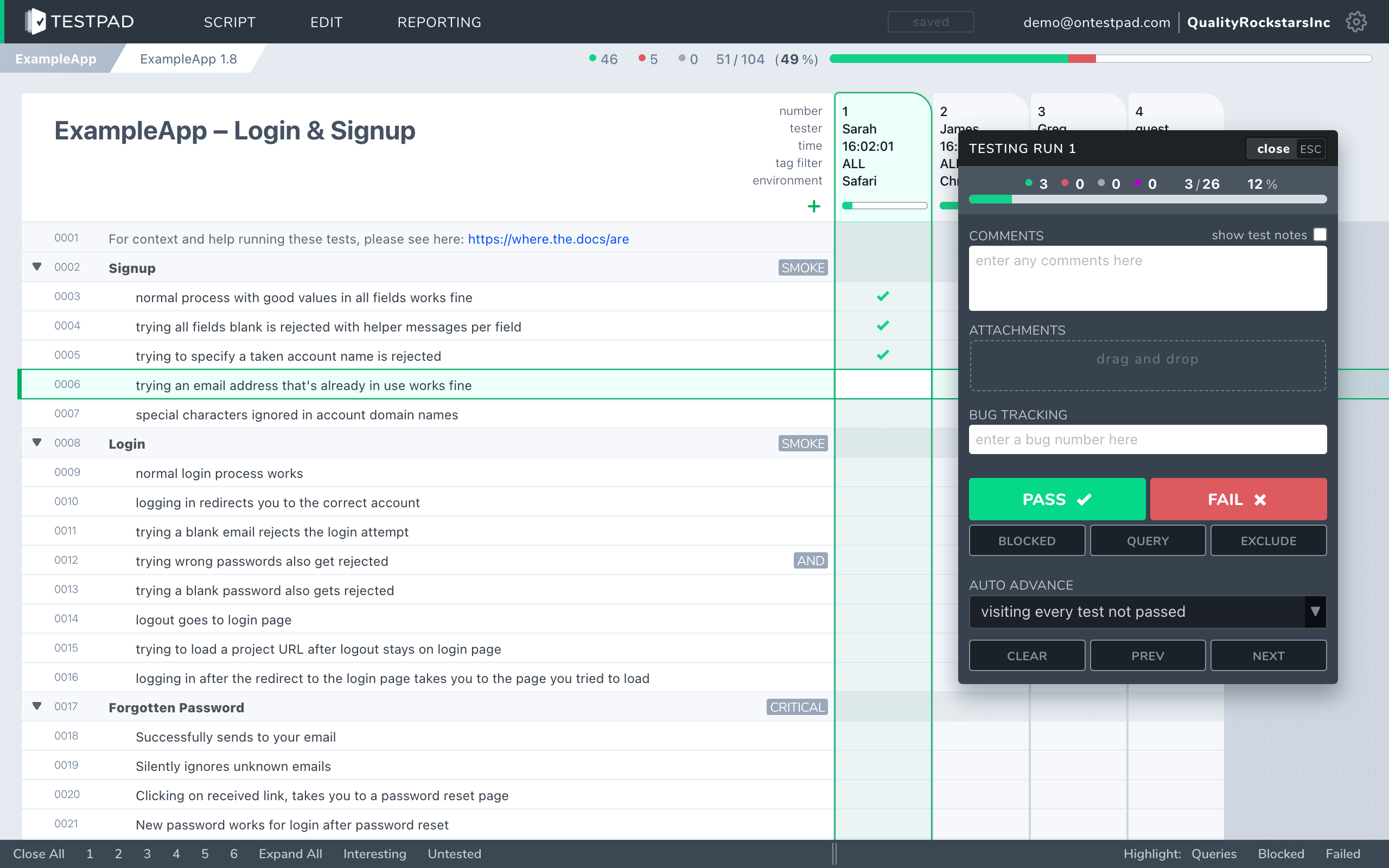
- Testpad's data model is different at the root: a test is one line of plain text, indenting creates structure, and you add a column per run and mark each prompt pass or fail as you go. There are no steps, no expected-result fields, no cycles.
- QMetry was acquired by SmartBear in December 2024. Its AI feature ("QMetry Intelligence," powered by HaloAI) generates structured test cases from a user story inside the tool. Testpad has an AI path too: you paste or import plain text from anywhere, including AI output, and it becomes a test plan, with the Testpad customGPT trained to output Testpad's plain-text prompts directly.
- Pricing for QMetry isn't publicly listed; you contact sales. Testpad is from $10/user/month, and guest testers are free.
- Neither is wrong for the right team. The question is whether your testing needs enterprise structure, in-tool generation of structured cases, Jira integration, and compliance features, or whether it needs to be light, fast, and open to testers without accounts.
What's the actual difference?
QMetry is an enterprise test management platform. Each test case has discrete steps, each with an action field and an expected result. Cases live in test suites, are grouped into test cycles tied to releases, and link to requirements and defects for end-to-end traceability. If you're on QTM for Jira, tests exist as Jira issue types, so traceability lives inside Jira. The standalone QTM platform works independently of Jira but covers the same structure. QMetry Intelligence can draft a test case from a user story, shortcutting the authoring work for large suites. The platform supports BDD, CI integration, and automation ingestion; for regulated industries it covers 21 CFR Part 11, GDPR, EU data residency, e-signatures, and full audit logging.
Testpad is built around the test plan, on its own. A test is a line of plain text. Indenting builds the plan's structure: group related tests under a heading, or spell a bigger test out over several lines. Add a column for each test run, and mark each prompt pass or fail as you go. There's no step-and-expected-result form, no test cycle to configure before you can run, no enterprise infrastructure to carry. You write the way you think, share the plan with a link, and anyone, whether they have an account or not, can run it.
If your team writes and maintains large, structured test suites across releases, with requirement coverage, audit history, and in-tool generation of structured cases from a story, QMetry is designed for that. Both tools have an AI path to authoring: QMetry generates structured cases inside the tool, while Testpad imports AI-written prompts, including from its customGPT. If you want testing to stay at the level of a checklist, fast to write and open to anyone, that's where Testpad fits.
How do Testpad and QMetry compare?
A side-by-side comparison of the aspects that matter when choosing.
| Testpad | QMetry |
|---|
| Data model | A test plan: a nested outline of plain-text prompts that read like a checklist, with a column per run | Step-based test cases (action + expected result) organized into suites, cycles, and releases; links to requirements and defects |
| Where it runs | Its own web app; no Jira needed | Standalone cloud (QTM) or inside Jira as an Atlassian Marketplace app (QTM for Jira) |
| Time to first test | Minutes; write a line and you're testing | Longer; configure suites, cycles, and case structure before running |
| Writing tests | Type a line, hit enter, repeat | Create structured test cases with action and expected-result fields per step |
| AI test authoring | Paste or import AI-written prompts from anywhere, including the Testpad customGPT trained to output Testpad's plain-text prompts | QMetry Intelligence (HaloAI) generates structured test cases from a user story inside the tool |
| Guest / UAT testers | Share a link; no login, no seat needed | Testers need a provisioned account in QMetry or, for QTM for Jira, in Jira |
| Requirement traceability | Lightweight: clickable issue links | Deep: requirement to test to execution to defect, with coverage metrics |
| Automation / BDD / CI | Push results from CI via the REST API; Gherkin syntax supported | First-class: BDD, CI integration, automation ingestion, parameterized execution |
| Reports | An instant shareable link | Built-in dashboards, charts, and release-level reporting |
| Audit trail / compliance | Not today | 21 CFR Part 11, GDPR, EU data residency, e-signatures, full audit logging |
| Pricing | From $10/user/month, guest testers free | Contact sales; pricing isn't publicly listed |
| Best for | UAT, regression, exploratory, ad-hoc, hardware bring-up, dev-led testing | Enterprise QA, large structured test suites, regulated industries, Jira-centric teams |
QMetry facts checked against SmartBear's QMetry product pages and the Atlassian Marketplace, June 2026.
Why do teams choose Testpad over QMetry?
Minutes to your first test. No suite structure, no cycle setup, no step-and-expected-result form before you can run. Open a project, type a line of plain text, add a column, and you're testing. For regression runs, UAT windows, and exploratory work, that speed matters.
Guest Testing for UAT. Invite someone outside the org and they test via a link with no login and no seat. QMetry requires every tester to be provisioned in the platform. For clients, stakeholders, or contractors running a two-week UAT cycle, not having to create and manage accounts for all of them changes the calculation.
Transparent pricing. Testpad publishes its prices. QMetry's pricing isn't publicly listed, which means a sales conversation before you can evaluate cost. Whether that's a problem depends on where you are in the buying process, but for teams that want to know what they're signing up for before they call anyone, Testpad is the simpler path.
No enterprise overhead if you don't need it. QMetry's depth, suites, cycles, releases, requirement matrices, compliance modules, is exactly what enterprise regulated teams need and exactly what adds friction for teams that just want to keep testing current. Testpad stays light; the plan is the plan.
Write-as-you-think speed. Exploratory testing suits a checklist plan: set a scope, explore within each prompt, record what you find. A step-and-expected-result form assumes you know the test before you run it, which isn't always how exploratory or ad-hoc testing goes.
"We use Testpad to track all of our testing. It offers the depth and flexibility to model our entire test plan, but remains simple enough that onboarding new testers is effortless. The import and export facilities are really helpful for migrating test plans from other test management tools."
Eric Wolf, Senior Solutions Architect, Bell
When is QMetry the better choice?
When your testing needs the structure it provides. For large, regulated, or compliance-sensitive QA programs, QMetry's step-based test cases, requirement-to-defect traceability, e-signatures, and audit logging are not optional niceties; they're the job. QMetry Intelligence drafts a structured test case from a user story inside the tool, which shortcuts authoring at scale; Testpad's AI path works differently, since you paste or import AI-written prompts (including from the Testpad customGPT) rather than generating cases in the tool. The Jira-native option (QTM for Jira) means tests sit inside Jira alongside the stories they cover, which appeals to teams that want testing and development to live in the same tool. If your process depends on any of these, Testpad won't cover it, and QMetry is the right choice. To see the wider field, our guide to QMetry alternatives covers it.
When is Testpad the better choice?
When testing needs to stay light and open. Teams running UAT with clients, regression passes without the overhead of structured test cases, exploratory sprints, hardware testing, or developer-led checking find Testpad fits how they actually work. You start in minutes, the plan is as simple or as detailed as the work needs, and anyone, inside or outside the org, can run it without an account. For work that doesn't need enterprise structure, carrying that structure doesn't help.
Common questions
Is Testpad a replacement for QMetry?
For lightweight manual and exploratory testing it can be: UAT, regression, ad-hoc checking, hardware bring-up, developer-led testing. If your work depends on step-based test case management, requirement traceability, compliance features, or deep Jira integration, QMetry covers things Testpad doesn't, and replacing it wouldn't make sense.
What's the actual difference in the data model?
QMetry stores step-based test cases: each test has discrete action and expected-result fields per step, organized into suites and cycles, linked to requirements and defects. Testpad stores a test plan as a standalone nested outline of plain text prompts, with one column added per test run.
Does QMetry work without Jira?
Yes. QMetry's standalone cloud platform (QTM) runs independently of Jira. The QTM for Jira edition runs as an Atlassian Marketplace app inside Jira and requires it. Testpad also runs independently; it doesn't need Jira or any tracker.
Can QMetry generate test cases with AI?
Yes, and so can Testpad, by a different route. QMetry Intelligence, powered by HaloAI, generates structured test cases from a user story inside the tool. Testpad lets you paste or import plain text from anywhere, including AI output such as ChatGPT, and turn it into a test plan; the Testpad customGPT is trained to output Testpad's plain-text prompts directly, so AI-written prompts drop straight into a plan.
Can clients or non-technical people test in Testpad?
Yes. Share a link and a guest tests with no login and no provisioned account. In QMetry, every tester needs a provisioned account, whether on the standalone platform or in Jira for QTM for Jira.
How does pricing compare?
Testpad is from $10/user/month, and guest testers are free. QMetry's pricing isn't publicly listed; you contact sales for a quote. The QTM for Jira Atlassian Marketplace app has an indicative entry tier of $36.30 total per month for teams over 10 users.
Does Testpad have an audit trail or compliance features?
Not today. Testpad is SOC 2 Type 2, but it has no audit trail, per-user permissions, or e-signatures. QMetry adds 21 CFR Part 11, GDPR, EU data residency, and full audit logging; if your process requires any of those, check before you move anything.
Does Testpad integrate with Jira?
Lightly. Set your tracker's URL pattern once and every issue ID you type in Testpad becomes a clickable link to the issue in Jira (or GitHub, Trello, and the like). There's a REST API for pushing automated results from CI. Outbound webhooks notify your other tools when runs finish or results change, directly or through Zapier and the like. There's no two-way sync and no coverage view inside Jira; QTM for Jira, being part of Jira, has those.
See the difference in five minutes
The fastest way to choose is to write a real test plan in each. Testpad's free 30-day trial includes all features and up to 20 users, with no credit card and nothing to install. Paste in a chunk of your existing tests and see how they read as a standalone checklist, no sales call required.