
EDITORIALS
What is a test plan in testing, and how does it differ from a test case?
A test plan and a test case are not the same thing – but they work together. Here's what each one is and how Testpad handles both.
Testpad vs Qase: test plans, not a unified QA platform
Qase brings manual test cases, automated runs and CI results into one platform; Testpad is a checklist of plain text prompts. How they differ, and when each fits.

By Stef
July 2, 2026
Share this article


he difference between Testpad and Qase is one of scope. Qase is a platform: it stores test cases in a repository, pulls in your automated results and CI runs, and layers AI on top to write and automate cases. Testpad is a lighter tool built around the test plan: a checklist of plain text prompts you write, run and share. This page sets out the difference, where each tool is stronger, and how the costs compare, so you can decide which fits the way your team tests.
Qase is built around a case repository plus your automation. A test is a case: preconditions, steps, expected results and fields, filed into suites in a repository. Test plans select cases from the repository, test runs execute them, and shared steps cut duplication between cases. Around that core sits the platform: reporters and an API push automated results in from CI, dashboards combine automated and manual outcomes, and AIDEN (Qase's AI agent) generates cases from requirements or converts manual cases into Playwright, Cypress or Selenium code, paid for with monthly AI credits. Qase describes the goal on its homepage: bring "CI results, automated tests, and manual runs into one place".
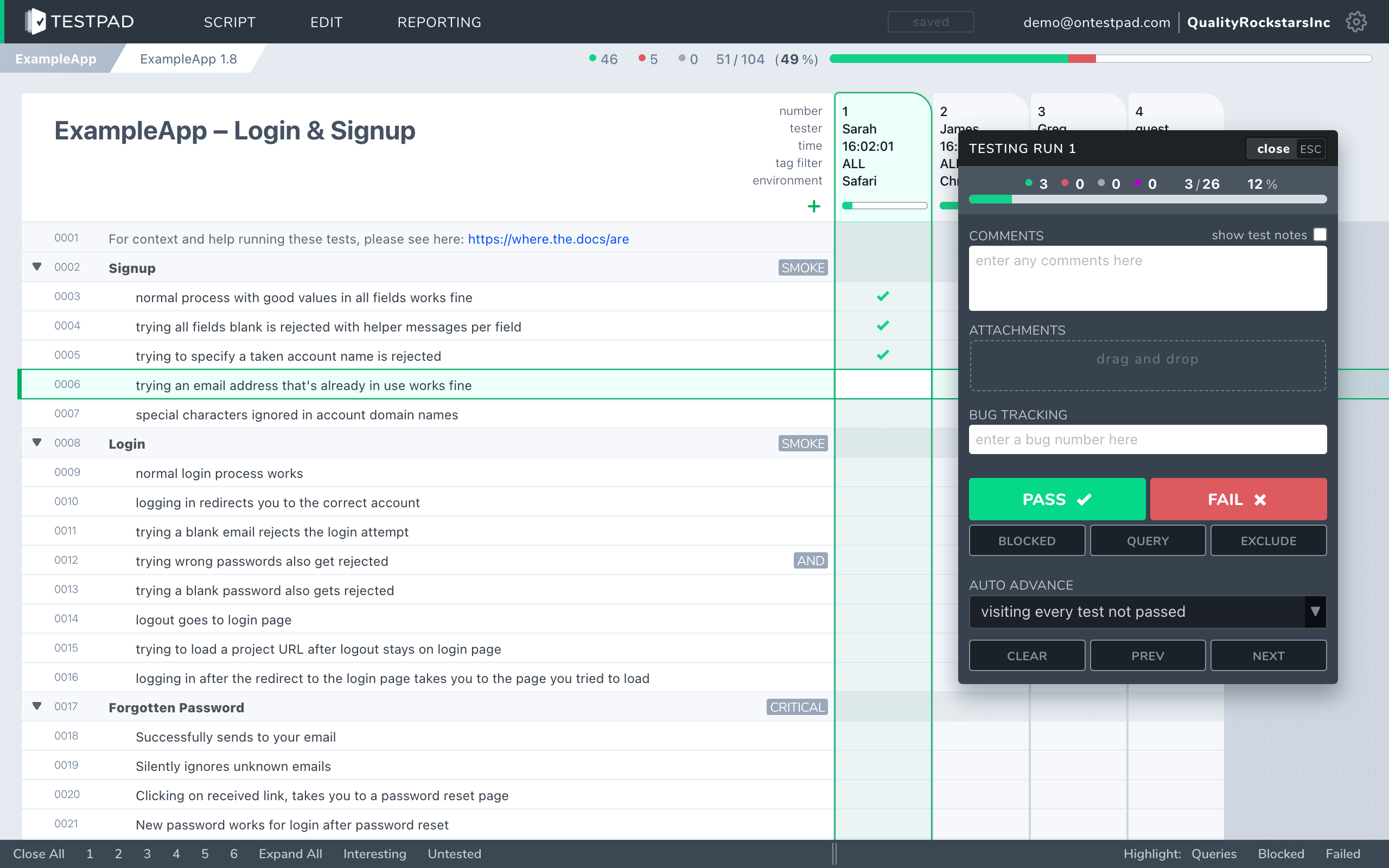
Testpad is built around the test plan. A test is a line of plain text. Indenting builds the plan's structure: group related tests under a heading, or spell a bigger test out over several lines. Add a column for each test run, and mark each prompt pass or fail as you go. There's no case repository to organize first: you write the way you think, and the structure comes from the outline, not from a form.
If your automation pipeline is the center of your quality picture, Qase is built to sit on top of it. If your testing is mostly people working through checklists, and a case record per check is more admin than the check deserves, that's the gap Testpad fills.
A side-by-side comparison of the aspects that matter when choosing.
| Testpad | Qase | |
|---|---|---|
| Data model | Documents holding test plans: each a nested outline of test prompts that look like a checklist | Repository of test cases with preconditions, steps and expected results, in suites; plans and runs draw from it |
| Time to first test | Minutes; no case structure to design | Longer; set up projects, suites and case fields first |
| Writing tests | Type a line, hit enter, repeat; or copy/paste import from AI suggestions | A form per case; AIDEN generates cases from requirements (uses plan's AI credits) |
| Automated testing | Push results from CI via REST API; results sit alongside manual runs in the same plan | A core strength: reporters for major frameworks, CI integrations, unified dashboards; AI converts manual cases to automation code |
| Guest / UAT testers | Share a link; no login, no seat | Every user recording results needs a seat; read-only seats are a paid add-on ($2 to $5 per user/month) |
| Reports | An instant link, shareable with anyone | Dashboards and analytics inside the platform |
| Free tier | No free tier; 30-day trial includes all features and up to 20 users | Free plan for up to 3 users and 2 projects |
| Per-user access control | Not today; anyone in an account can edit | Role-based access control on the Business plan |
| Integrations | Clickable issue links (Jira, GitHub, Trello); REST API and webhooks | 35+ integrations across issue trackers, CI/CD and automation frameworks |
| Pricing | From $10/user/month, guest testers free | Free (3 users, 2 projects); Startup $24/user/month; Business $30/user/month |
| Best for | UAT, regression, exploratory, ad-hoc, hardware bring-up | Dev-centric teams unifying automation and manual QA in one platform |
Facts checked against qase.io and its published pricing, July 2026.
Guest testing, where guests don't have to log in. When a release needs more eyes, hand a client, a freelancer, or a non-technical coworker a link and they're testing in minutes. No account, no seat, no onboarding call. In Qase, everyone who records a result needs a seat, and even read-only access is a paid add-on. For client UAT rounds, that difference decides the tool.
Write-as-you-think speed. No form per case. Type a prompt, hit enter, type the next. A 30-line regression plan takes minutes to draft, and it reads like the checklist it is. Qase's AI can draft cases for you, but you still end up owning a repository of case records that someone keeps current.
Plans people outside QA actually read. A Testpad plan looks like a document, so a product manager or a client can review what will be tested before a run and see what happened after it, from a shared link. Test reports are links too, not exports.
The whole tool on every plan. Testpad has one feature set; plans differ only by tester count. Qase spreads capability across tiers: role-based access control, case review and traceability arrive on the Business plan, SSO on Enterprise, and AI work draws on a monthly credit allowance with extra credits billed per use.
Less platform than you're paying for. Qase is priced and built as a unified QA platform. If your team isn't feeding automated results in, you're carrying the platform without using the unification. If your testing is checklists, runs and reports, Testpad does all of it for $10/user/month equivalent, and guest testers stay free.
When automation is the center of your testing and you want manual QA in the same picture. Qase's reporters, CI integrations and unified dashboards do things Testpad doesn't attempt: automated runs and manual runs in one view, flaky-test tracking, and release-readiness reporting. AIDEN goes further than any AI feature in Testpad, generating cases from requirements and converting manual cases into Playwright, Cypress or Selenium code. The free plan (3 users, 2 projects) is enough for a small dev team to start on, and larger orgs get role-based access control, SSO and requirement traceability on the higher tiers. Qase also holds SOC 2 and ISO 27001 certifications, which matters if your buyers ask for them. If that platform shape fits your team, Qase is a strong modern choice; our guide to the best test management tools covers the wider field.
When your testing is led by people rather than pipelines: you run UAT with clients or stakeholders, do regression and exploratory work, test hardware, or your developers check their own features and a case repository is more machinery than the job needs. Teams of that shape are testing in minutes, keep the plan light enough to stay current, and pull in outside testers without buying seats. Automated results can still land in the same plan through the API, so a mostly-manual team with some automation isn't forced onto a platform for it.
"We use Testpad to track all of our testing. It offers the depth and flexibility to model our entire test plan, but remains simple enough that onboarding new testers is effortless. The import and export facilities are really helpful for migrating test plans from other test management tools."
Eric Wolf, Senior Solutions Architect, Bell
For manual and exploratory testing, yes: UAT, regression, hardware, release checklists. If your team depends on Qase's automation side (reporters, CI dashboards, AI conversion of cases to code), Testpad doesn't do those today; it accepts automated results via its REST API but it isn't an automation platform.
Qase stores each test as a case (preconditions, steps, expected results) in a repository organized into suites; plans and runs draw cases from that repository. Testpad stores a test plan as a nested outline of plain text prompts, with a column added per test run.
Yes. Free plan for up to 3 users and 2 projects, with 500 MB storage and 30 days of test history (checked July 2026). Testpad doesn't have a free tier; it has a 30-day trial with all features and up to 20 users.
Yes. Share a link and a guest tests with no login, no seat, and very little training. In Qase, recording results takes a seat on a paid plan, and read-only access is a paid add-on.
Testpad is from $10/user/month, and guest testers are free. Qase is Startup is $24/user/month month-to-month or $19.20/user/month billed annually; Business is $30/user/month month-to-month or $24/user/month billed annually; a free plan covers up to 3 users and 2 projects. If most of your testers are part-time or external, guest testing is where the difference shows; if you're three people on Qase's free plan, Qase is cheaper until you grow past it.
It records their results. Push pass/fail outcomes from CI via the REST API and they sit in the same plan, and the same reports, as your manual runs. Outbound webhooks notify your other tools when runs finish or results change. Testpad doesn't run automation or convert manual tests into automation code; Qase does both.
Not built in. Teams draft tests with their own AI tools (there's a custom GPT for writing Testpad test scripts) and paste the result straight into a plan; the outline format means AI suggestions import as plain text, with no per-use credits. Qase's AIDEN is deeper: it generates cases from requirements and converts them to automation code, metered by monthly AI credits.
Not today. Anyone in a Testpad account can edit anything. If your process requires per-user permissions or audit history, Qase's Business and Enterprise plans have them; check before you commit either way.
The fastest way to choose is to write a real test plan in each. Testpad's free 30-day trial includes all features and up to 20 users, with no credit card and nothing to install: paste in a chunk of your existing test cases and see how they read as a checklist.

If you liked this article, consider sharing
EDITORIALS
A test plan and a test case are not the same thing – but they work together. Here's what each one is and how Testpad handles both.

TESTING TOOLS
TestRail stores tests as case records in a database; Testpad is a nested checklist of plain text prompts. How they differ, and when each fits.

EDITORIALS | TESTING TOOLS
Five test tools that fit teams of two to ten, compared on seat pricing, setup time and upkeep: Testpad, Tuskr, Testiny, TestLodge and Qase's free tier.

TESTING TOOLS
Compare Testpad with TestRail, Xray, Qase and more: head-to-head pages, alternatives roundups and buying guides.