he difference between Testpad and PractiTest is structural, and it shapes almost every comparison between them. PractiTest is a large test management platform: requirements, a test-case library, test runs, issues, and reports, configured and linked together. Testpad is a checklist tool: a test is a line of plain text, and a test plan is an outline of those prompts with a column per run. This page sets out that difference, where each tool is stronger, and how the costs compare.
The short version
- PractiTest is a full test management system. You work across five modules: capture requirements, build a test library of reusable cases, assign test sets for execution, track issues, and generate reports. A tag-based filter system links everything in any direction, so you can trace a requirement to the tests that cover it and back again.
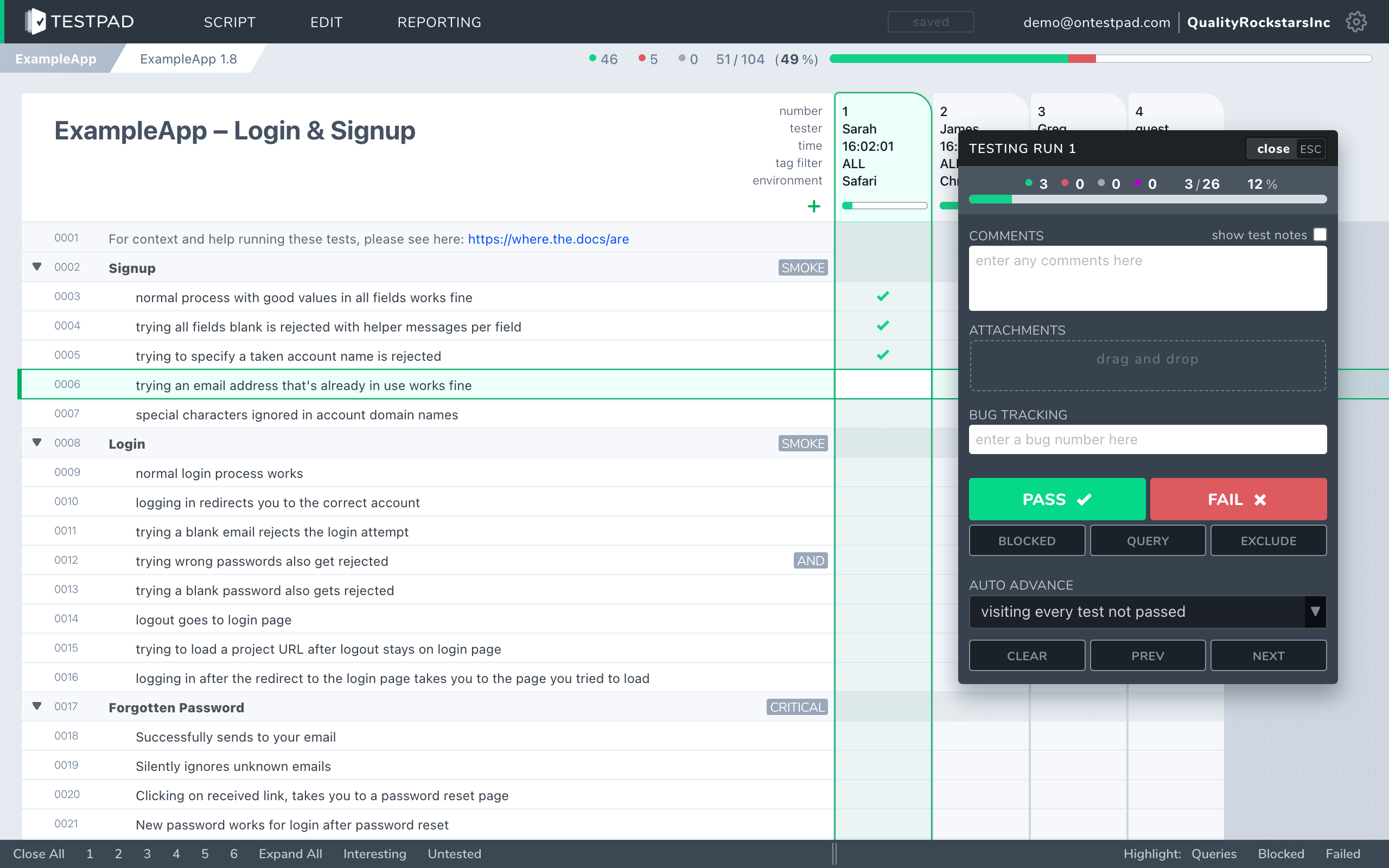
- Testpad is a test plan tool. Write a line, hit enter, write the next. Add a column for a test run, mark each prompt pass or fail, share the result with a link. No modules to navigate before you can run a test.
- Teams choose PractiTest for end-to-end traceability from requirements to defects, structured reusable test libraries, Jira and Azure DevOps integration, and added compliance controls (ISO 27001, audit logs, per-user permissions). Teams choose Testpad for fast manual testing, UAT with outside testers, and a lighter price at small scale.
- PractiTest's Team plan is $49/user/month with a minimum of five seats; Testpad is from $10/user/month, and guest testers are free.
- Neither choice is wrong. It comes down to whether you need the structure and traceability of a full platform, or whether a checklist is enough.
What's the actual difference?
PractiTest is a structured end-to-end platform. It links requirements to test cases, test cases to runs, runs to the defects they raise, and all of it to reports. The organizing principle is a tag-based filter system: rather than rigid folders, you tag tests and filter across any dimension you define, so you can build a view that shows every test covering a particular requirement, feature, or release in seconds. Test cases are reusable; edit one and every test set that includes it reflects the change. There's a two-way sync with Jira and Azure DevOps, automation ingestion from CI pipelines, and compliance certification (SOC 2 Type II, ISO 27001). What you get is a system designed to give visibility and traceability at scale.
Testpad is built around the test plan. A test is a line of plain text. Indenting builds the plan's structure: group related checks under a heading, or spell a bigger scenario out over several lines. Add a column per test run, mark each prompt pass or fail, share the result with a link. There's no requirements module, no reusable test-case library, no tag taxonomy to design. You write the way you think, and anyone who can read can run the tests.
If your process requires a traceable chain from requirements through tests to defects and reports, PractiTest's model is designed for that job. If you want to write a test plan quickly and share it without onboarding the whole team into a multi-module system, that's the gap Testpad fills.
How do Testpad and PractiTest compare?
A side-by-side comparison of the aspects that matter when choosing.
| Testpad | PractiTest |
|---|
| Data model | A test plan: a nested outline of plain-text prompts that read like a checklist, with a column per run | A database of test cases (steps, expected results, custom fields), linked to requirements, runs, and issues |
| Organizing principle | Indented outline; structure comes from the text itself | Tag-based filter system across unlimited custom dimensions |
| Time to first test | Minutes; write a line and you're testing | Longer; set up modules, configure tags, and build a test library before the first run |
| Writing tests | Type a line, hit enter, repeat | Create reusable test cases in the library; assign them to test sets for execution |
| Requirement traceability | Lightweight: clickable issue links | End-to-end: requirement to test case to run to defect, in both directions |
| Guest / UAT testers | Share a link; no login required; guests can execute tests and mark pass/fail | Commenter seats give stakeholders read-only view with sign-in required; they cannot execute test runs |
| Stakeholder visibility | Shareable report link | Dashboards and configurable reports; Commenter seats for sign-in-gated read access |
| Automation / CI | Push results from CI via REST API | Two-way Jira and Azure DevOps sync; automation ingestion from CI pipelines |
| Reusable test cases | No dedicated library; copy a plan and edit | Yes: edit one test case and all sets that include it update |
| Reports | An instant shareable link | Configurable dashboards and reports across modules |
| Audit trail / permissions | Not today | Yes: user-level permissions, activity logs |
| Compliance | SOC 2 Type 2 | SOC 2 Type 2, ISO 27001 |
| Pricing | From $10/user/month, guest testers free | $49/user/month (Team, minimum 5 seats); Corporate is a custom quote |
| Best for | UAT, regression, exploratory, ad-hoc, hardware bring-up, dev-led testing | Teams needing end-to-end traceability, structured test libraries, compliance, and deep tracker integration |
PractiTest facts checked against practitest.com, June 2026.
Why do teams choose Testpad over PractiTest?
Minutes to first test. PractiTest is a large platform that takes configuration and setup before you can run a test: you build a test-case library, design a tag taxonomy, and map test sets to requirements. In Testpad, you type a line and you're testing.
Guest testing for UAT. Testpad's Guest Testing lets you invite testers with no account at all: share a link, and a client, stakeholder, or freelancer can run the tests and mark pass/fail without signing up. PractiTest does offer stakeholder access via Commenter seats, but they're different: Commenters need a login and can view and comment but cannot execute test runs. If you need outside testers to actually run your test plan, that distinction matters.
Lower minimum cost for small teams. PractiTest's Team plan starts at five seats. Testpad sells in tiers too, but its Essential tier starts at three testers, so a two or three-person team starts lower. And Testpad's guest testers are free.
Plain-text authoring. A Testpad test is a sentence, written the way you'd describe the check to a colleague. No step-and-expected-result form, no mandatory fields. For ad-hoc, exploratory, and UAT work, the writing process matches the thinking process.
No mandatory structure. PractiTest's value proposition includes a structured system for traceability and visibility. That structure is also overhead: you maintain the module relationships, the tag taxonomy, the test library, and the mapping from requirements to tests. Testpad's overhead is one outline.
When is PractiTest the better choice?
When you need end-to-end traceability and structured test management. PractiTest's tag-based filter system gives you visibility in any direction across requirements, tests, runs, and defects, at the scale where coverage gaps and release-readiness dashboards matter. Its reusable test cases mean a product change triggers an edit in one place, not a dozen. The two-way Jira and Azure DevOps sync keeps your test and defect data consistent without manual work. And for teams operating under tighter compliance requirements, PractiTest adds ISO 27001, per-user permissions, and audit logs that Testpad doesn't have today (Testpad is itself SOC 2 Type 2).
One thing to plan for: PractiTest is a substantial tool. Getting a team up to speed typically means demos and sandbox time, not a half-hour of clicking around. Its UI is functional but often called dated in customer reviews. And the five-seat floor on the Team plan can feel expensive before you've filled those seats. Those aren't disqualifiers, but they're worth accounting for during evaluation. Note that the Capterra sample for PractiTest is relatively small, so public review averages may not fully represent the range of team experiences.
When is Testpad the better choice?
When you want testing to be light, fast, and open to people who aren't in your test management system. You run UAT with clients or freelancers who shouldn't need to create accounts, do regression and exploratory testing, test hardware, or your developers test their own code and a structured test-case form is more overhead than the check warrants. Teams of that shape get going in minutes, keep plans light enough to stay current, and don't pay for a five-seat minimum when two people do the testing.
"We use Testpad to track all of our testing. It offers the depth and flexibility to model our entire test plan, but remains simple enough that onboarding new testers is effortless. The import and export facilities are really helpful for migrating test plans from other test management tools."
Eric Wolf, Senior Solutions Architect, Bell
Common questions
Is Testpad a replacement for PractiTest?
For lightweight, fast manual testing it can be: UAT, regression, exploratory, hardware, dev-led testing. If your process depends on end-to-end requirement traceability, a reusable structured test library, two-way Jira sync, or compliance certification, those are things PractiTest is built for and Testpad doesn't replicate.
What's the actual difference in the data model?
PractiTest organizes testing across five modules connected by a tag-based filter system: requirements map to test cases, which run in test sets, which generate issues and feed reports. Testpad stores a test plan as a standalone nested outline of plain text prompts, with a column added per test run.
How does guest testing in Testpad compare to PractiTest's Commenter seats?
They're meaningfully different. In Testpad, a guest needs no account: follow a link and they can run tests and mark pass/fail. PractiTest offers Commenter seats, but they require signing in and they're read-only; Commenters can view results and leave comments but cannot execute test runs. If you need outside testers to run your test plan and record results, Testpad's guest testing is designed for that; PractiTest's Commenter seats are not.
How does pricing compare?
Testpad is from $10/user/month, and guest testers are free, charged for the people testing in Testpad. PractiTest's Team plan is $49/user/month with a minimum of five seats; for 10 seats that's $5,880 per year. Corporate pricing is a custom quote.
Does Testpad integrate with Jira?
Lightly. Set your tracker's URL pattern once and every issue ID you type in Testpad becomes a clickable link to the issue in Jira (or GitHub, Trello, and similar). There's a REST API for pushing automated results from CI. Outbound webhooks notify your other tools when runs finish or results change, directly or through Zapier and the like. There's no two-way sync and no coverage view inside Jira; PractiTest's Jira integration covers both directions and is considerably deeper.
Does PractiTest handle automation?
Yes. PractiTest supports ingesting automated results from CI pipelines and integrates with Jira and Azure DevOps for two-way sync. Testpad takes CI results via its REST API but doesn't do bidirectional tracker sync. If automation and CI integration are central to your process, PractiTest does substantially more.
Does Testpad have requirement traceability?
Lightly. You can drop issue IDs into any test prompt and they become clickable links to the tracker. There's no built-in requirements module and no bidirectional coverage view. PractiTest's tag-based filter system traces requirements through tests to runs and defects in any direction; Testpad doesn't do that.
Does Testpad have an audit trail or per-user permissions?
Not today. Testpad is SOC 2 Type 2, but it has no audit trail or per-user permissions. PractiTest adds user-level permissions, activity logs, and ISO 27001. If your process or regulatory context requires those, check Testpad's current capabilities before making a switch.
See the difference in five minutes
The fastest way to choose is to write a real test plan in each. Testpad's free 30-day trial includes all features and up to 20 users, with no credit card and nothing to install. Write a plan, add a run column, and share the result with a link: if that's the shape of testing you need, you'll know quickly.