Agile testing tools: how to choose the right one for your team
Choosing an agile testing tool is more about fit than features. Here's how to figure out what you really need based on how your team tests, who's involved, and how often you release.
gile teams tend to shortlist the same six testing tools: spreadsheets, Qase, Testmo, Zephyr, TestRail and Testpad. The right choice depends less on features and more on fit: who does the testing, how often you release, and how much process overhead you can stand. This guide compares all six and shows how to choose.
At a glance
Lightweight: Testpad (checklist-style plans, guest testers, no training needed, from $10/user/month)
Jira-native: Zephyr (built for QA specialists, pricing tied to your Jira user count)
Most feature-complete: TestRail (steep learning curve, from $35/user/month)
Just starting out: a spreadsheet is fine until several people need to test at once
What matters when choosing: ease of entry, exploratory testing support, concurrent testing, and progress everyone can see
The rest of this guide explains the reasoning: what agile testing demands from a tool, what to look for, and the mistakes teams make when choosing.
What makes a tool suitable for agile testing?
Agile testing is fundamentally different from traditional software testing (our agile testing guide covers the full approach, and this comparison sets it against the traditional way). Instead of a separate testing phase after development finishes, testing happens continuously as features are built – sprint by sprint, through the agile development lifecycle. Testers work alongside developers, product managers contribute to test planning, and everyone on the team shares responsibility for quality. Google's DORA research finds that teams who test continuously throughout delivery, rather than in a separate phase, ship more stable software with less team burnout and less painful deployments.
This collaborative, iterative approach needs tools that:
Don't get in the way – Your team doesn't need lengthy setups, mandatory fields, or enforced workflow when it comes to agile.
Anyone can use – Not just QA specialists. If a developer or product manager needs to run through tests, they shouldn't need training.
Keep up with change – Requirements shift mid-sprint. Your testing tools need to adapt just as fast, not lock you into rigid structures.
Show progress clearly – The whole team needs visibility into what's been tested and what hasn't, without digging through detailed reports.
The problem is that many "agile testing tools" were built for waterfall processes and just got an agile label slapped on. They still expect detailed test cases written upfront, formal sign-offs, and separate testing phases – exactly what agile teams are trying to avoid.
What should you look for in an agile testing tool?
Four things matter most: how quickly anyone on the team can start using it, whether it supports exploratory as well as scripted testing, whether several people can test at once, and whether progress is visible at a glance.
Lightweight beats feature-heavy
Traditional test management systems make you document everything upfront: preconditions, detailed steps, expected results, priorities, requirements traceability. This creates massive overhead for teams that just need to track "here's what we should check, here's what we found."
Agile teams benefit more from checklist-based approaches. Write down the things worth testing, run through them, and record what you discovered. You can always add detail where you need it, but you're not forced to document everything like you're preparing for an audit.
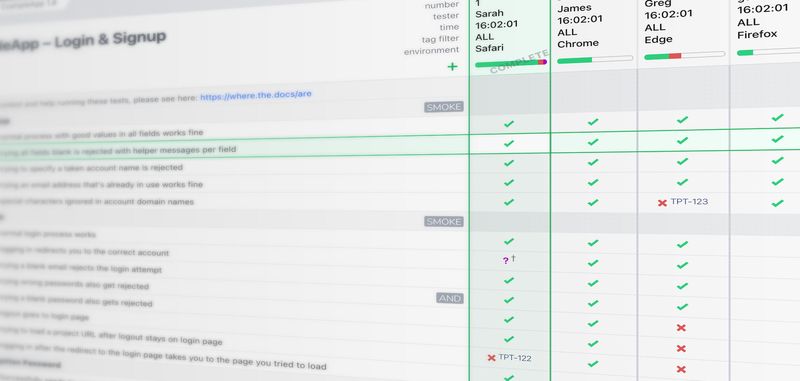
This is why many teams start with spreadsheets, because they're simple and fast. The problem with spreadsheets isn't the lightweight approach; it's that they become hard to manage when you're testing across multiple configurations, tracking results over time, or need several people testing simultaneously. Tools like Testpad sit in that sweet spot – lightweight like a spreadsheet, but built specifically for testing so you don't hit those collaboration and tracking limitations.
Concurrent testing
Agile emphasizes whole-team quality. That means developers, product managers, and other team members all contribute to testing – not just dedicated QA people.
Your testing tool needs to support this. Can multiple people test at the same time? Can developers quickly see what's already been checked before they start testing their feature? Can product managers review test results without needing a walkthrough of the system? If your tool requires everyone to become a testing expert just to participate, you've added a bottleneck that slows down the collaborative feedback loop agile depends on.
Progress everyone can see
Agile teams run on quick status: what's been tested, what's failing, what's left before release. If answering that means compiling a report, the information arrives too late to act on. Look for a tool where anyone can see progress at a glance, without a walkthrough. A quick way to send a bug to Jira or GitHub is still worth having, but that's a given; the visibility is what changes how the team works.
Flexibility for exploratory testing
Here's a crucial difference between agile and traditional testing: in agile, you're often testing features that are still evolving. Exploratory testing is central to this – requirements change based on what you learn. You discover edge cases you didn't anticipate. You need to explore, not just execute predefined test cases. Tools that force fixed test case structures make this harder. You want something where you can quickly jot down ideas, reorganize your testing approach mid-session, and capture discoveries without fighting the tool's expectations of how testing "should" work.
Which agile testing tools are worth using?
All of these tools support agile testing in some form, but they suit different team sizes, budgets, and ways of working. Here's how they compare.
Tool
Easy to get started
Whole-team friendly
Exploratory testing
Concurrent testing
Integrations
Pricing
Spreadsheets
Yes
Yes
Possible but messy
No
No
Free
Qase
Yes
Some training needed
Yes
Yes
35+ integrations
Free (up to 3 users), paid from $24/user/month
Testmo
Yes
Some training needed
Dedicated sessions
Yes
CI/CD, Jira, GitHub
From $99/month (10 users)
Zephyr
Jira users only
QA-specialist focus
Limited
Yes
Jira-native
Depends on Jira user count
TestRail
Steep learning curve
QA-specialist focus
Possible but rigid
Yes
Extensive
From $35/user/month
Testpad
Yes
No training needed
Yes
Yes
API + integrations
From $10/user/month
What mistakes do teams make when choosing agile testing tools?
Most teams make at least one of these mistakes when choosing a testing tool. Here's what to watch out for.
Choosing based on features rather than fit
The tool with the most impressive feature list isn't necessarily the best choice. What matters is whether it supports your team's real-life workflow. A simpler tool that everyone uses is far more valuable than a powerful system that's too cumbersome for quick testing cycles.
Assuming more process equals better quality
Agile testing is about continuous feedback, not comprehensive documentation. Tools that enforce heavyweight processes – detailed test cases, formal review cycles, mandatory fields – often work against agile principles rather than supporting them. You end up spending more time managing tests than actually testing.
Trying to automate everything immediately
Yes, test automation is valuable for regression testing. But in agile, you're continuously building new features that are still changing. Automating tests for features that aren't stable yet means you'll spend more time maintaining broken automation than you save.
Start with manual testing using lightweight tools. Automate the stable, repetitive tests worth automating. This matches the agile principle of responding to change rather than following a plan.
Ignoring who actually does the testing
If your testing approach in agile means the whole team contributes, but your tool requires specialized training, you've created a problem. The barrier to entry matters – can a developer quickly run through a checklist before merging their pull request? Can a product manager verify the happy path without needing to understand test case management systems?
What tools do agile teams actually use?
Most agile teams run a mix: a lightweight test tool or spreadsheet for manual checks, a unit-test framework, their issue tracker for bugs, and CI to run what's automated.
Small teams often start with the absolute basics:
Spreadsheets or simple checklists for manual testing
Unit tests written in whatever framework their developers know (Jest, pytest, JUnit)
Their existing issue tracker for bugs (GitHub Issues, Jira, Linear)
Maybe basic CI/CD to run automated tests
This works fine until collaboration becomes messy (multiple people editing spreadsheets), tracking gets difficult (can't see what passed/failed across multiple test runs), or visibility suffers (stakeholders asking for status updates you can't easily provide).
That's typically when teams move to a dedicated test management tool – but they're usually looking for something that maintains that lightweight simplicity while solving those specific pain points.
Testpad works this way. It's structured enough that you can track testing across configurations and test runs, collaborative so multiple people can test simultaneously, and visual so anyone can see progress at a glance.
As teams grow or face more complexity, they might add:
UI automation frameworks (Cypress, Playwright) for critical user journeys
API testing tools (Postman, REST Assured) for backend verification
More sophisticated CI/CD orchestration
Better reporting and test analytics
But the core principle stays the same: tools should support agile testing practices, not force teams to adapt their approach to fit the tools.
Start simple, expand when you need to
Begin with whatever lets you test immediately. A spreadsheet and your existing bug tracker might be perfectly adequate. Don't invest in elaborate tooling before you understand what problems you're actually solving.
Here's what typically drives teams to look for better test management:
Testing across multiple browsers or devices and spreadsheets can't track all those results clearly
Multiple people need to test simultaneously and basic tools get messy
You need to show sprint-over-sprint progress and your current setup doesn't make that visible
Stakeholders want quick status updates and it takes too long to pull that information together
These are the pain points Testpad was built to solve – giving you structure and visibility without the overhead of traditional test case management.
Add specialized tools when simpler approaches create problems, not because you think you should have them. Testing tools should make testing easier. If they don't, you've chosen the wrong tools or brought them in too early. This iterative, respond-to-real-needs approach is exactly what agile methodology is about – which is why the best agile testing tools are the ones that support that philosophy rather than fight against it.
Start managing your agile testing with Testpad
Testpad gives you structured test management that works at agile speed – simple checklists, clear progress tracking, and visibility for the whole team. Start your free trial – no credit card required.