
EDITORIALS | EXPLORATORY TESTING
What is exploratory testing?
Exploratory testing is essential to uncovering hidden issues and improving the quality of real-world usage. This guide covers what it is, when it pays off, and how to make it trackable.

The agile lifecycle repeats five stages every sprint: plan what to build, build it, test it, show stakeholders, and reflect on the process before starting again.

By Pheobe
April 18, 2026


he agile software development lifecycle is a repeating cycle where teams move work through planning, development, testing, review, and retrospective stages in short iterations called sprints. Each sprint lasts one to four weeks: the team plans what to build, builds and tests it, shows it to stakeholders, reflects on what went well (or didn't), then starts again.
At a glance
Traditional development works like an assembly line – finish all planning, then all development, then all testing. By which point the requirements have probably changed anyway. Agile runs these activities in parallel across short cycles. While you're building this sprint's features, you're already planning the next sprint and testing what was just completed yesterday.
Here's what happens at each stage and where testing fits in.
No. Agile is an approach to organizing software development work, not a programming language or specific technology. You can write agile code in Python, Java, JavaScript, or any other language. "Agile code" just means code developed using the agile approach – typically with practices like continuous testing, frequent releases, and collaborative development.
The confusion likely comes from seeing agile mentioned alongside technical terms. But agile describes how teams work together, not what they use to build software.
The agile approach values adapting to change over following fixed plans. Instead of spending months on detailed planning before writing any code, agile teams work in short cycles and adjust based on what they learn.
The term comes from the Agile Manifesto, written in 2001 by 17 software developers who wanted an alternative to documentation-heavy, slow-moving processes. They outlined four core values:
In practice, this means working in short cycles (sprints), staying in constant communication, and changing direction when you learn something new instead of being locked into plans created months ago.
You can read more about what agile testing is in our dedicated guide.
Every sprint follows the same five stages:
| Stage | Typical duration (two-week sprint) | Key output | Where testing fits |
|---|---|---|---|
| Sprint planning | 2-4 hours | Sprint backlog | Testers raise "how will we know this works?" questions |
| Daily standup | 15 minutes per day | Blockers surfaced | Testers hear what's ready to test |
| Development and testing | Most of the sprint | Working, tested features | Continuously, as each feature is completed |
| Sprint review | 1-2 hours | Stakeholder feedback | Test results back up the demo |
| Sprint retrospective | 1-2 hours | One or two process improvements | Testing timing and gaps get discussed |
Here's what happens at each one.
Sprint planning is when the team decides what to build during the upcoming sprint. This usually takes two to four hours at the start of each sprint.
The product owner (or whoever represents user needs) brings a prioritized list of features and fixes. The team discusses each item, estimates effort, and commits to a realistic amount of work they can finish before the sprint ends.
This is where testing considerations start. Testers ask questions like "How will we know this works correctly?" and "What scenarios should we check?" These questions often reveal that requirements aren't clear enough to start building yet – which is much better to discover now than three days before the sprint ends.
The output is a sprint backlog – the specific list of work the team committed to finishing by the end of the sprint. Some teams create test plans during sprint planning, others prefer lighter approaches like test checklists that can be built up as testing progresses throughout the sprint.
Daily standups happen every day during the sprint. The entire team meets for 15 minutes, usually at the same time each day. Each person answers three questions: What did I complete yesterday? What am I working on today? Is anything blocking my progress?
These quick check-ins keep everyone on the same page without long meetings – testers find out what's ready to test, developers learn what bugs need fixing urgently, and product owners track whether features are progressing as expected.
If someone raises a blocking issue, the team doesn't solve it during standup – they'd blow past 15 minutes and defeat the whole purpose. They schedule a separate discussion with whoever needs to be involved.
This is where most of the sprint happens. Developers write code, testers test features as they're completed, and everyone works toward finishing the sprint's committed work.
Testing doesn't wait until the end of the sprint. As soon as a developer finishes a piece of functionality – even something small – testers can start checking it. Bugs get found and fixed while the code is fresh in the developer's mind, not three weeks later when they've moved on to something completely different.
Developers also write automated tests during this stage, often at the unit level to verify individual functions work correctly. Some teams practice test-driven development, writing tests before writing the code that makes those tests pass.
Testers might do exploratory testing, work through test checklists, or run automated regression suites. The specific approach depends on what the feature needs and how much time exists before the sprint ends. Many agile teams use test prompts rather than detailed test cases – short reminders like "check password complexity rules" or "verify account lockout behavior" that guide testing without dictating every step.
This stage isn't a neat assembly line. A developer might finish feature A on Tuesday, the tester finds bugs on Wednesday, and the developer fixes them on Thursday while also starting feature B. Work overlaps and flows based on what's ready at any given moment.
Sprint review happens at the end of the sprint. The team demonstrates completed work to stakeholders – product owners, managers, customers, or anyone interested in seeing what got built before gathering feedback. Stakeholders ask questions, point out problems, and suggest changes. Sometimes this feedback gets added to the backlog for future sprints.
Only completed work gets demonstrated. If a feature is 90% done but still has known bugs, it doesn't get shown. The sprint review focuses on what's actually ready to release or very close to it.
Testers often help present during sprint reviews, especially when stakeholders ask detailed questions about how something works or what testing was done. Having clear test results – what passed, what failed, what still needs checking – makes these conversations much easier.
The sprint review helps everyone understand progress toward larger goals and catch problems before they become expensive to fix.
The sprint retrospective is when the team discusses how the sprint went and what to improve. This happens after the sprint review, usually the same day or the next day.
The team asks three questions: What went well? What didn't go well? What should we change for the next sprint? This might surface issues like "Testing started too late in the sprint" or "Requirements weren't clear enough" or "We committed to too much work." The team picks one or two specific improvements to try in the next sprint.
Retrospectives aren't complaint sessions where everyone vents about problems and nothing changes. The goal is identifying concrete improvements that will make the next sprint more effective – adjusting how much work gets committed, improving communication between developers and testers, or changing when certain activities happen.
After the retrospective, the cycle starts again with planning the next sprint.
Individual pieces of work move through the lifecycle at different speeds, but they follow a similar path. Think of it like a kitchen during dinner service. Some dishes take 10 minutes to prepare, others take 45. But they all go through the same stations – prep, cook, plate, serve. Features work the same way through sprints.
A feature starts as an idea in the product backlog. During sprint planning, the team pulls it into the sprint backlog and commits to completing it. During development, a developer builds it. During testing, a tester checks it. If bugs are found, the developer fixes them and the tester retests. Once testing passes, the feature is done for that sprint.
Some features are small enough to move through this flow in a day or two. Others take the entire sprint or span multiple sprints if they're large and get broken into smaller pieces. The key is that testing happens close to development. In a two-week sprint, a feature built in the first few days gets tested in the first week, not the last day of the sprint. This gives developers time to fix any problems found.
Testing happens continuously throughout the sprint, not just at the end. As soon as something is ready to test, testing starts. (Our agile testing guide covers this side of the lifecycle in full.) Google's DORA research backs this up: teams that test continuously throughout delivery, instead of in a separate phase, ship more stable software with less burnout and less painful deployments.
This creates a different rhythm than traditional development. Instead of having weeks or months for testing at the end of a project, testers have days or sometimes just hours to verify a feature works before the sprint ends.
Testers need to be efficient. They can't test every possible scenario for every feature. They focus on the most important checks – does the basic functionality work? Are there obvious bugs? Does it match what was agreed during planning?
More thorough testing might happen in later sprints when the feature is more stable. But every sprint, the goal is catching major problems quickly so they can be fixed before the code gets buried under new work. Teams need a way to track what's been tested and what still needs checking. This could be a simple checklist, a spreadsheet, or one of the many agile testing tools designed for sprint-based teams, like Testpad – lightweight enough to keep up with sprint pace but structured enough to show progress clearly. In Testpad, teams copy last sprint's folder of scripts into the new sprint, add tests covering whatever's new or changed, and test in the fresh copy, so the old copy stays a faithful record of what was tested that sprint, and with what results.
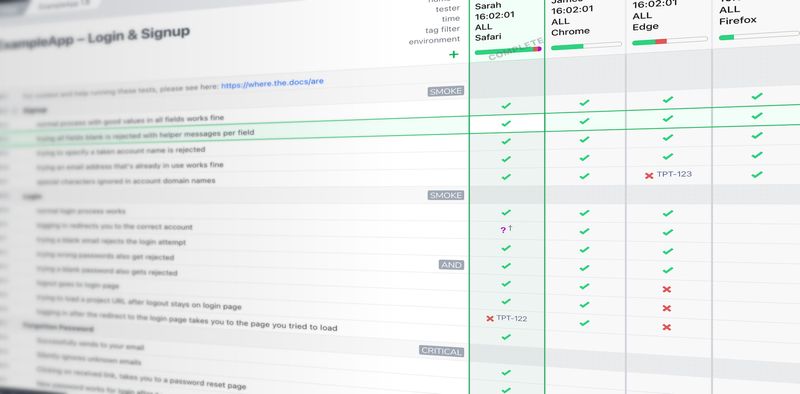
Between sprints, teams either take a short break to handle loose ends or run the next sprint back-to-back.
Some teams take a day or two between sprints to handle loose ends – fixing small bugs that didn't get completed, preparing the environment for the next sprint, or doing planning work. Other teams run sprints back-to-back with no gap. As soon as one sprint's retrospective ends, the next sprint's planning begins. There's no single right answer. It depends on how much cleanup typically needs doing and whether the team feels rushed without a buffer.
There are no specific rules. The Scrum Guide only sets maximums: eight hours for sprint planning, four for the review, and three for the retrospective on a one-month sprint, with shorter events for shorter sprints. These are typical time allocations for a two-week sprint:
For a one-week sprint, you'd compress these proportionally. For a four-week sprint, you'd likely keep the meeting times similar but have more development and testing time. The danger is letting meetings consume too much of the sprint. If the team spends 10 hours in meetings during a two-week sprint, that's a lot of time not building and testing features.
Sometimes the team commits to more work than they can finish in a sprint, or a feature turns out more complicated than expected, or critical bugs eat up time that should've gone to new features.
Unfinished work doesn't just roll into the next sprint automatically. During sprint planning for the next sprint, the team decides whether to continue that work or prioritize other things. Sometimes partially completed features get abandoned if priorities shift.
The goal isn't to finish everything every sprint. The goal is to finish the most important things and maintain a sustainable pace. If a team routinely completes only 60% of their committed work, that's a signal to commit to less work per sprint.
Every sprint adds features that need checking in future sprints to verify they still work after new changes. This is regression testing. Some teams automate regression checks so they can run them quickly every sprint without consuming tester time. Other teams take a manual approach with checks they work through periodically.
The regression suite grows with every sprint. Early in a product's life, regression testing takes minutes. After a year of development, it might take hours or days. Teams need a plan for this – either through automation, efficient manual checking, or accepting they'll only regression test the most critical features each sprint. Without some strategy, you eventually spend entire sprints just checking that old features still work.
While every team adapts agile differently, some practices consistently help teams succeed:
Test early and often – Don't save testing for the last day of the sprint. Instead, test features as soon as they're built so developers can fix problems while the code is fresh.
Keep sprint commitments realistic – It's better to consistently finish what you commit to than to overcommit and routinely leave work incomplete.
Make retrospectives actionable – Rather than only discussing what went wrong, pick one or two concrete changes to try in the next sprint.
Maintain good communication – Daily standups, direct conversations between developers and testers, and quick problem-solving keep work flowing smoothly.
Track testing without slowing down – You need visibility into what's been tested, what's working, and what problems exist. Heavyweight test case management tools often create more work than value in agile environments. Teams do better with approaches that balance structure and flexibility – whether that's simple checklists for small teams, spreadsheets for medium teams, or tools like Testpad that provide clear tracking without the documentation overhead of traditional test management.
Adapt the process – The lifecycle provides structure, but teams adapt it. Some combine sprint review and retrospective into one meeting, others split sprint planning into two sessions days apart, and some skip daily standups when everyone sits together and talks all day anyway.
The core pattern remains: plan work, build it, test it, show it, reflect on it, repeat. The specific implementation depends on what works for each team's context.
The first sprint of a project often includes setup work that doesn't happen in later sprints – configuring development environments, establishing testing approaches, creating initial documentation structures. Think of it as the sprint where everyone figures out how they're actually going to work together.
The last sprint before a major release might include extra testing, documentation, or deployment preparation that doesn't happen in normal sprints. But mostly, every sprint follows the same lifecycle. That consistency is one of agile's strengths – teams get into a rhythm and become efficient at moving work through the stages.
Signs the agile lifecycle is working well:
Signs the lifecycle isn't working:
When the lifecycle isn't working, the retrospective is the place to discuss why and what to change.
Smaller teams (three to five people) often move through the lifecycle more informally – they might skip formal sprint reviews if everyone already knows what got built, and their daily standups might take five minutes.
Larger teams (eight to 12 people) need more structure to stay coordinated. Sprint planning takes longer because more people need to understand the work, daily standups take the full 15 minutes, and sprint reviews are more formal because more stakeholders attend.
Very large projects might split into multiple teams, each running their own sprint lifecycle. This creates coordination challenges – teams need to align on shared dependencies and integration points.
The main difference is when testing happens. In traditional development, teams complete all planning, then all development, then all testing. This sequential approach means testers don't see features until months after they were designed, and bugs aren't found until it's expensive to fix them.
Agile compresses these activities into short repeating cycles. Testing happens continuously alongside development throughout every sprint. This catches problems early when they're cheap to fix and gives teams flexibility to adjust based on what they learn. Testing isn't saved for the end but built into how features get developed, which is the core difference between agile and traditional. For a fuller comparison, see agile testing vs traditional testing.
New to this way of working? Start with our guide on how to get started with agile testing.
The agile lifecycle only works when testing keeps up with development. If you're spending more time managing test documentation than actually testing, or if stakeholders can't see what's been tested at a glance, you need a lighter approach.
Testpad gives agile teams just enough structure with test checklists that are quick to create and easy to update, clear visual progress tracking, and simple reports that show what's working and what isn't.
Try Testpad free for 30 days – no credit card required.

If you liked this article, consider sharing
EDITORIALS | EXPLORATORY TESTING
Exploratory testing is essential to uncovering hidden issues and improving the quality of real-world usage. This guide covers what it is, when it pays off, and how to make it trackable.

EDITORIALS
Choosing an agile testing tool is more about fit than features. Here's how to figure out what you really need based on how your team tests, who's involved, and how often you release.

EDITORIALS
Agile testing means two things – testing within a formal Agile framework, and simply testing with agility. This guide covers both: the methods, the lifecycle, the tools, and the challenges.